We’d been wanting to talk about Google Search Console for a while, and the Trilogi (TLG Commerce) Marketing department has finally taken the plunge. This tutorial will introduce the curious to a free Google tool that can bring big benefits to eCommerce businesses.
Before we start, you need to understand the concept of a URL (Uniform Resource Locator).
Basically, a URL is an arrow that tells Google:
“Here are my files on the server”
And why am I explaining this before talking about Google Search Console?
Very simple: Google Search Console lets users view URLs as if they were Googlebot and understand the indexing assessment method used.
Here’s a very practical definition to help you understand GSC:
“Google Search Console is our airport for diagnosing our site’s URLs (planes).
Googlebot would then be in charge of preparing the planes (URLs) so they take off correctly.
The passengers on these planes are our users or visitors, and we are the air traffic controllers of this peculiar airport”
Google’s goal is to give users the best browsing experience, and we have to make it as easy as possible for them to find what they’re looking for.
How to set up Google Search Console
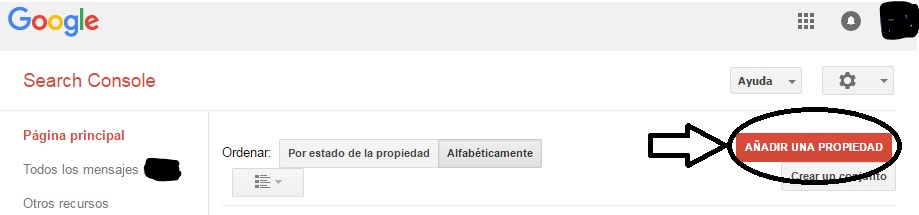
This tool gives us a huge amount of information. To access it, go to the Google Search Console page and add your web property.
The next step is to verify your property and prove that you own the website:
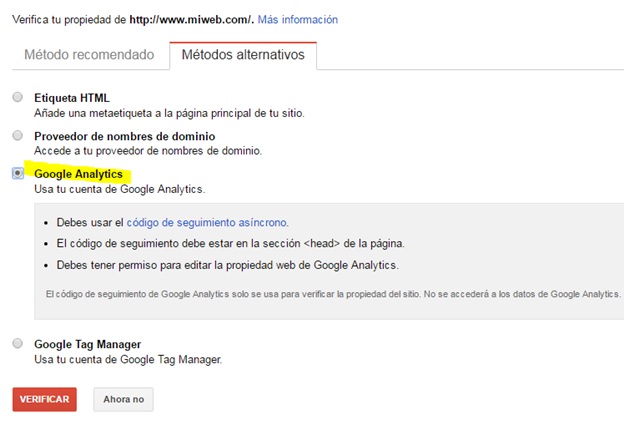
The quickest and simplest process is to use the alternative method provided by Google Analytics.
To verify the property, you just need to be an administrator of your Google Analytics account and follow the steps shown in the image.
Once your property is verified, you can start using Google Search Console in full.
Ready to learn what benefits and insights you can get from GSC?
Let’s start by looking at our dashboard:
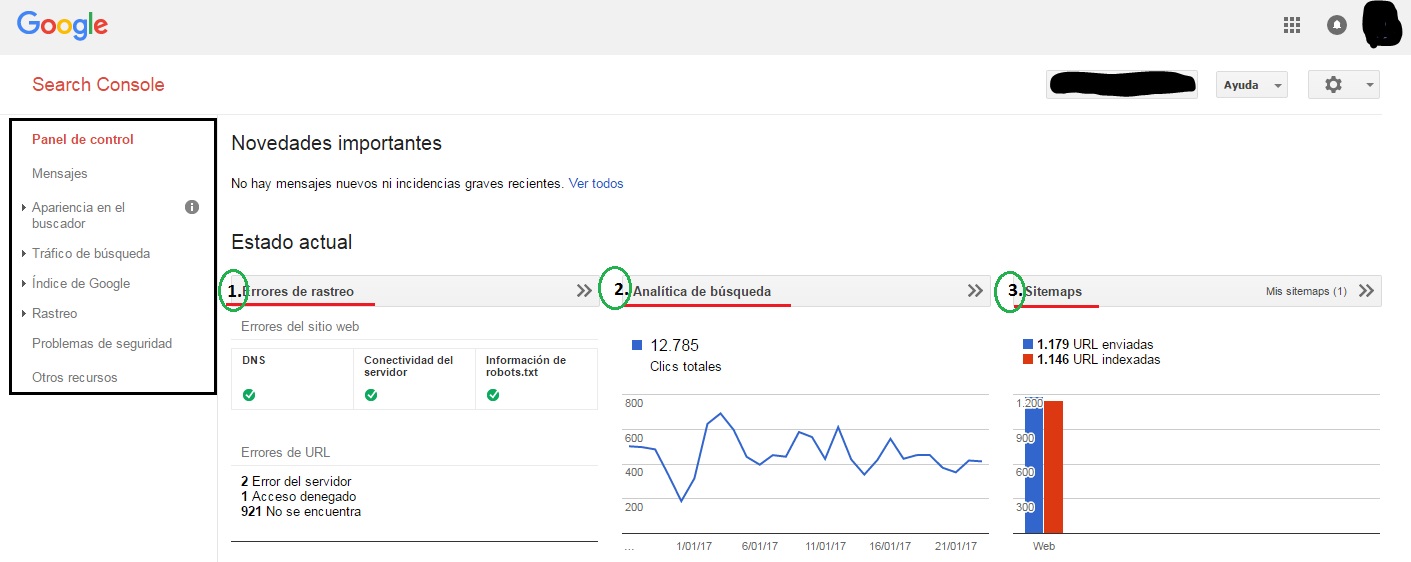
On the left you’ll find the different features available in GSC.
The dashboard overview gives us vital information about the health of our URL network.
We can break this chart down into 3 blocks:
-
Crawl Block
Shows server-side errors (DNS, connectivity, robots.txt file and HTTP errors)
-
Search Block
Shows which URLs users have searched for and visited through Google’s search engine.
You’ll only get data from Google’s search version; searches on Safari, Firefox, Oracle or other search engines can’t be analyzed
-
Sitemaps Block
Shows how many indexable URLs in our sitemaps have ended up being indexed by Googlebot.
Ideally, the ratio of submitted to indexed URLs should be similar, a sign of healthy linking to the site.
The dashboard’s job is to alert you to global issues that could hurt your website.
With GSC we can anticipate possible changes in the internal link structure that ends up indexed in Google’s search engine.
The sections of Google Search Console
GSC has such a wide range of features that I’ll focus only on the ones you can really get the most out of.
Search appearance:
The first important aspect is structured data and rich cards (Google rich cards).
Structured data makes it easier for Google’s crawlers to process the information on our website.
This structuring can be done with data markup, such as the well-known schema.org vocabulary and formats like Microdata and RDFa.
These schema.org markers are tags added as attributes inside the website’s HTML code.
Without structured data, your website will lose visibility.
The reason is simple: Google won’t be able to display it the way you want, nor classify it with 100% of its details.
If you need help managing structured data, I recommend this Google helper tool, which guides you based on your industry. You’ll save time and money!
Rich cards are a big plus once you’ve structured your data:
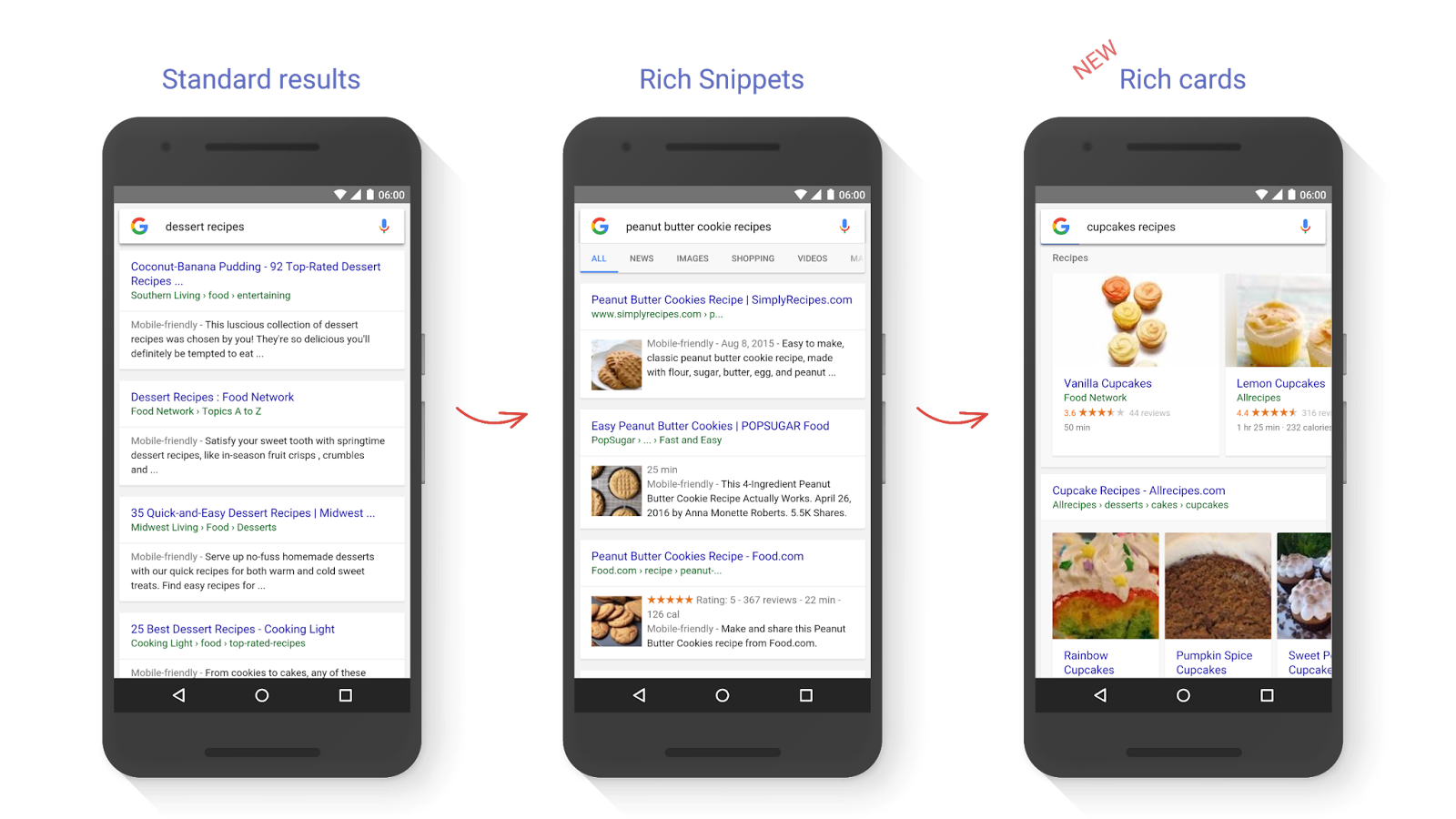
The benefits for users are impressive. They’ll get direct information about the site’s quality and whether it’s truly relevant to them.
Return visit rates improve, making it more likely that the user will come back.
Something that’s starting to be implemented in the “Mobile Web” world is AMP formats (Accelerated Mobile Pages).
I recommend visiting this page on AMP Formats to understand the concept, and we’ll soon publish an explainer post for those of you interested in focusing on mobile.
Search traffic
This section summarizes how users end up finding us, which queries they run on the search engine and which segments our site attracts.
We also get a list of the links pointing to our site and of the internal links on our website.
Taking care of internal linking matters more:
- It gives your website unique qualities.
- It sets you apart and gives you relevance, authority and trust in the eyes of users.
Google Index
A section devoted entirely to showing how Google has indexed the indexable URLs it found.
This small section also reports blocked resources served by another host or by undefined websites.
Googlebot gets upset if it can’t crawl something, however simple. It’s better to give Googlebot instructions in the robots.txt file than to allow full access to the site.
You’ll find a great, thorough definition in the following post
Crawl
The Crawl section tells us how Google sees our website and what errors it finds.
Crawl errors are problems the bot runs into when processing information from a URL on our site.
Googlebot groups errors by device, both desktop and smartphone.
It reports both site errors and URL errors.
In crawl stats you get information about Googlebot’s activity over the last 3 months.
We can see how it has handled our sitemaps and in what way.
Watch out for spikes or dips in download time or kilobytes downloaded.
They should set off alarm bells, because Googlebot overactivity is not good for our site’s future.
The Fetch as Google section lets users process a URL the way Google’s bot would.
There are two options: “Fetch” and “Fetch and render”, each with its own purpose.
First, let’s look at the differences between them:
- Fetch: runs a specific URL on the website and shows an HTTP response without loading additional resources.
This is vital if you want to know the security status of that URL on the site. - Fetch and render: does the same as “fetch” but loads additional resources, showing the full page. Its purpose is to compare visual aspects that Googlebot may miss but you, as a user, would notice. This helps you optimize designs and images on both desktop and mobile.
Keep in mind that once we ask GoogleBot to render the URL for desktop or mobile, it will take a few minutes.
Here’s an image of what it would look like:
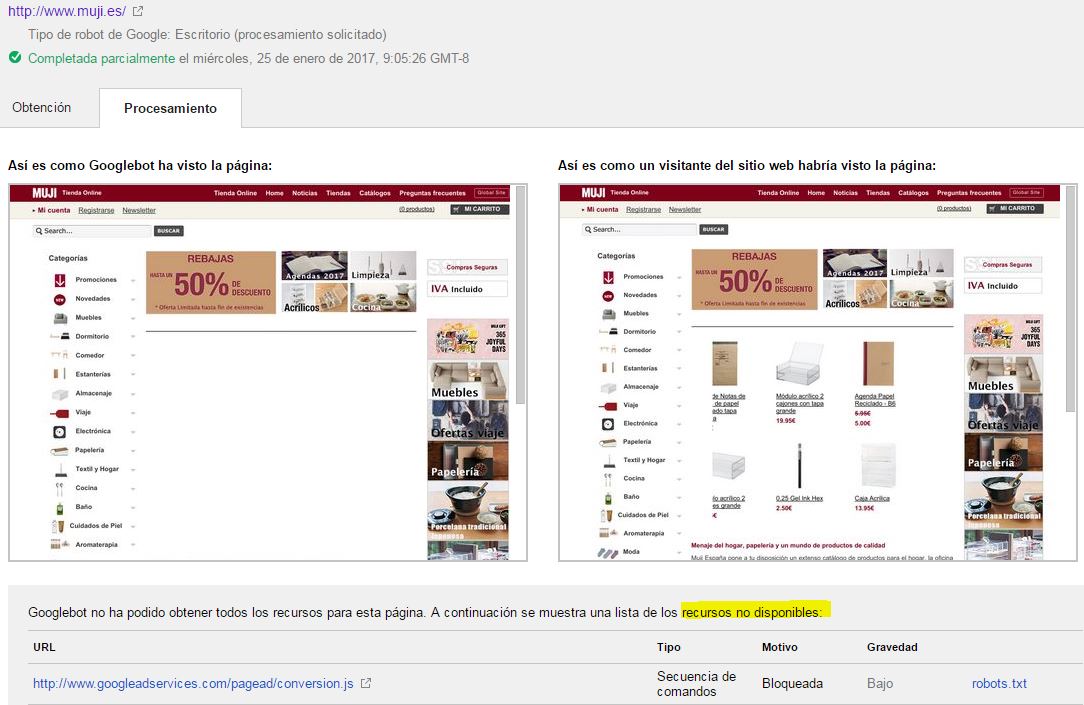
Notice how GoogleBot doesn’t see the products being displayed.
Essentially, GoogleBot has an artificial nature that only analyzes what we let it analyze; we can disguise things with code.
In general, we’d only be giving GoogleBot unnecessary work and could expose ourselves to future penalties.
When there are doubts and enough at stake to create risks for your eCommerce, it’s time to contact Trilogi (TLG Commerce)
Security Issues
You should check this section especially when you start the indexing process for your website.
GSC will alert you to any security discrepancy or error (badly implemented code or warnings about content from domains with malicious software).
My advice: check this section twice a week when you’re starting out with your website, and once a month once it’s up and running smoothly.
Other Resources
Finally we reach the last point, and the best one of all.
This is where GSC’s oil wells are.
You’ll find a list of tools that can help you get more out of Search Console, and you can link them together to boost their performance.
I’d highlight Google PageSpeed Insights to check your website’s loading speed and how to improve it.
It’s also worth taking a look at Google Merchant Center for future campaigns on Google’s Shopping network.
Conclusion
Search Console provides information about visibility on the Google search network and the crawl and indexing status of our website.
Above all, it shows which channels our visitors use to find us and which search terms they type into the search engine to reach our site.
To sum up, keep in mind that Google Search Console won’t reach its full potential unless you can cross-reference its data with other Google tools.
For example, Google Analytics.
Do you think your link network is healthy and ready to be indexed by Googlebot?