If you’ve made it this far, it’s because you’d like to boost your eCommerce sales and you’re thinking about advertising on Facebook and/or Instagram. Either that, or you’re already investing in Facebook Ads and not getting the results you expected. Whatever your case, let us warn you that you won’t get good results overnight. However, once you fine-tune your ads and choose the right type of campaign for each stage of the conversion funnel, the results will be spectacular. Read on, and at the end of this post we’ll show you one of the best-performing ad formats for selling your eCommerce products and which type of campaign to use depending on where your audience is in the funnel. Shall we start?
What is Facebook Ads and what advantages does it offer over other advertising platforms?
Facebook Ads is Facebook’s advertising platform. When you create a campaign in Facebook Ads, your ads slip in among posts from friends and pages your potential customers follow, on both Facebook and Instagram. You probably knew that already, but there’s much more. How much does advertising on Facebook cost? What’s the difference between advertising on Facebook and on Google? What are the benefits of advertising on Facebook? Below we explain the main advantages over other advertising platforms.

Pros and cons of advertising on Facebook
PROS:
- Cheap traffic. CPC is lower on Facebook ads than on Google Ads. You can even see campaigns with a CPC of €0.01.
- Targeting is its strong point. The great potential of Facebook Ads lies in targeting, and you’ll be surprised how precisely you can target your ads.
- Remarketing means success. You can create ads to re-engage users who have previously visited your online store or a specific section of it. Do this, and your conversion rate will go up.
- For online stores with a large catalog, dynamic ads are a great resource. Dynamic ads let you showcase your catalog dynamically without having to create an ad for each product or section.
- Facebook finds new customers all on its own. Lookalike audiences are perfect for reaching new potential customers. You can create them from audiences similar to users who have visited your online store to audiences similar to those who have recently engaged with your social media.
- Instagram Stories ads to reach new buyers. Millennials and Generation Y are constantly checking Instagram’s famous stories. Slipping in among the stories of their friends and the brands they follow can be a great way to connect with them.
CONS:
- Lower-quality visits with less purchase intent. Facebook is cheaper than Google Ads, but a visit from someone searching for a specific product or service on a search engine isn’t the same as one from someone browsing Facebook or Instagram who sees an ad.
- High bounce rate for visits from Facebook Ads. Visits from Social Ads tend to have a bounce rate of 60% to 80%. Social media users are usually more reluctant to leave the platform, which makes our strategy of driving traffic to the online store somewhat harder.
- Unclear policy on rejected ads. Facebook’s policy on whether certain ad content is accepted is unclear. Even major advertisers run into problems getting their ads approved. Some are rejected based on very subjective rules.
- Difficulty implementing the Facebook pixel and creating a feed. The famous Facebook pixel is essential if we want to measure campaign success and reach users who have behaved in a certain way in our online store. Although Facebook tries to make it easy, in most cases technical support is needed to implement it correctly and ensure reliable data. Besides the pixel, you’ll probably also need help uploading a feed to the Facebook catalog in order to create catalog sales ads and dynamic product ads.
What do I need to advertise on Facebook and Instagram successfully?
As we mentioned in the cons of advertising on Facebook, one of the difficulties you may face is needing to hire an agency to create Social Ads campaigns, or even having to contact your online store’s developers to set up the pixel or upload the feed to a Facebook catalog. Needless to say, at TLG Commerce we’ll be happy to help. If you have any questions, you can also leave a comment on this post and we’ll answer it.
Here’s what you need to do to advertise on Facebook successfully:
Create a Facebook Page
To advertise on Facebook you’ll need a Facebook Page. You can create one in under 5 minutes from your personal Facebook account or from Facebook for Business.
Create an ad account
Obviously, to run ads on Facebook you need an ad account. Creating one is very simple:
- Go to this link and click “Create ad”
- Create an account and fill in all the details
- You’ll automatically be taken to your Ads Manager
Set up the Facebook pixel and the Conversions API
First, create a pixel as explained here.
If you can access your online store’s code, you can add the Facebook pixel yourself. Just place the base code on every page and it will be active. In addition to the base code, you’ll also need to add events to specific pages, such as the add-to-cart page or the checkout confirmation page, to measure conversions.
Not sure and need help? Then you’ll need to send the pixel code to your developer. And if you need more information, visit the Facebook Help Center, where everything is explained.
[2022 update]
In addition to the Facebook pixel, also implement the Conversions API.
Upload your online store’s product feed to the Facebook catalog
The product feed is a file containing all the products in your online store. If you already have a Google Shopping feed, you can use the same one to upload to a Facebook catalog.
Follow these steps to create a catalog and upload your product feed:
- Go to Catalog Manager and click “Create Catalog”.
- Choose the “Commerce” catalog type and create the catalog.
Once your catalog is set up, you can add your online store’s products through a feed or by connecting the catalog to your eCommerce platform.
Which Facebook Ads format is best for selling on Facebook and Instagram?
After this introduction, you’re probably eager for us to tell you which type of ad works best if you want to sell more. Here’s the answer. Our recommendation for selling in eCommerce is to create product catalog sales ads using Facebook’s new Collections format, targeting remarketing audiences.
But before we go on, we’d like to make a quick note.
These ads will NOT work for you if…
- You have NOT previously run impression or click campaigns to build Brand Awareness.
- You have NOT given Facebook time to populate your remarketing audiences
- Your Facebook pixel is NOT set up properly and incorrect conversion events are firing
- Your online store does NOT get at least 5,000 visits a month
- You do NOT run promotions in your online store
- You do NOT stand out from the competition in any way
If you’ve passed all the filters, congratulations! You’re ready to start selling more with Facebook Collections ads. Without a doubt, Facebook’s new Collections is one of the best ad formats for selling through Facebook Ads.
Create a Facebook Collection ad and start selling
What is Facebook Collection
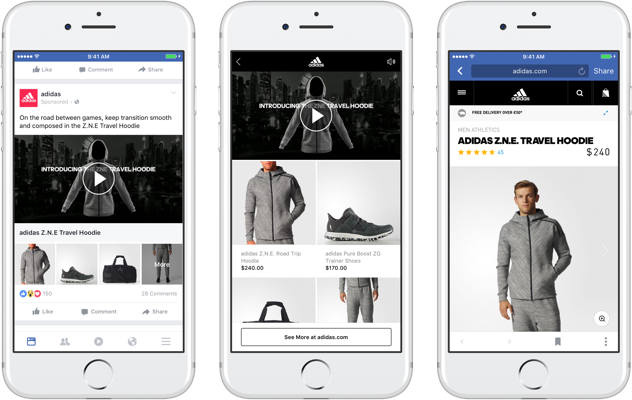
It’s a format similar to Canvas. It creates an Instant Experience featuring a product catalog. This Instant Experience is a full-screen experience that opens when someone taps the ad on their mobile device.
You’ve probably already noticed these ads. Four products appear at the bottom of the ad, which can be shown dynamically or selected manually.
Specifications for Facebook Collection ads
If you want to create a Collection ad, keep the following requirements in mind:
Objectives compatible with this ad format:
- Traffic
- Conversions
- Catalog sales
- Store traffic
Placements where the ad will appear:
- Facebook News Feed (mobile only)
- Instagram Feed
Image and video specifications:
- The recommended image size is 1200 x 628 pixels
- The recommended video aspect ratio is 16:9 or 1:1
Text specifications:
- 90 characters for the body text (shown above the content)
- 25 characters for the headline (shown above the four products)
Create a collection ad step by step
Here’s a step-by-step guide to creating a Facebook Collection ad:
- Go to Ads Manager.
- Click “+ Create”.
- Choose the traffic, conversions or catalog sales objective and click “Continue”.
- Choose the URL of your online store or the section you want to promote and link the ad to your Facebook pixel.
- Choose a remarketing audience made up of custom audiences of people who have visited your online store and lookalike audiences similar to them. If you don’t know how to create audiences, the Facebook Help Center explains how.
- Now assign a budget to the ad set and the time period you want the ads to run, and click “Continue”.
Once you’ve set up the ad set, it’s time to create the collection ad:
- Choose your company’s Facebook page and Instagram profile
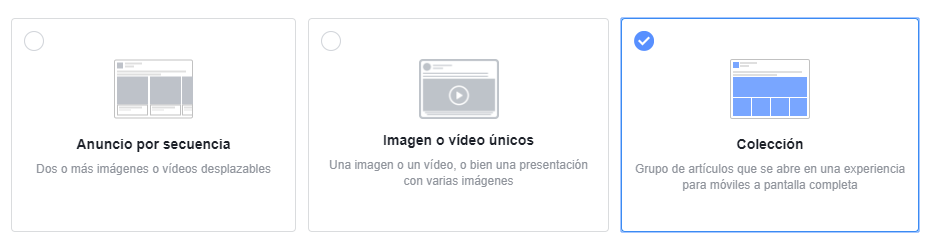
- Select the “Collection” format

- Select the “Storefront” template
- Create your instant experience with all the products in your catalog or by building a product set with a selection of products. (For example: products from a specific category or products priced under €30)
- Fill in the title and copy, then save your changes.
Benefits of using this ad format
Format designed to sell products
Higher return on investment
100% mobile
Immersive shopping experience
The stages of the conversion funnel: which type of Facebook Ads campaign should you choose for each stage?
When choosing which type of campaign to create, it’s essential to know where your audience sits in the conversion funnel. Reaching users who know nothing about the brand is not the same as reaching followers who have already bought the brand’s products. Here is an example of the buyer journey:

Attention stage
At this stage they don’t know us yet, so we need to focus on building brand awareness with the following campaigns:
- Engagement
- Reach
- Brand awareness
- Traffic
Interest stage
At this stage we want to reach audiences who already know us, or similar audiences, with campaigns such as:
- Traffic
- Lead generation
- Messages
Desire and action stage
In the final stage of the conversion funnel, the key is to re-engage specific audience groups with a higher likelihood of converting through remarketing audiences. The best campaign types for driving conversions are:
- Conversions (the conversions objective is only recommended if you have recorded at least 25 conversions in the last week)
- Catalog sales
We hope this post helps you get the results you expect from Facebook Ads. Selling your products on social media isn’t easy, but with a well-planned strategy and a clear objective for each campaign, you’ll be able to multiply your conversions.