A few days ago, Instagram announced its new service and winning bet, Instagram Shopping, now available in the United States, Spain, Canada, France, England, Italy and Brazil. Brands have already started selling on Instagram by tagging products in their organic posts, and the first success stories from US brands are emerging. Today we show you how to set up Instagram Shopping, what its benefits are and how to start using it.
What is Instagram Shopping?
Instagram Shopping is a feature designed for businesses with a profile on the social network. It lets you sell products on Instagram quickly, simply and effectively. You upload a photo to Instagram and add price tags to your products so your followers can buy directly from your posts, making the buying process very simple and visual.
Why should I use it? Discover the benefits
Now that we know what Instagram Shopping is, the question is: what are the benefits of adding it to our Instagram marketing strategy?
Many brands have used Instagram Shopping since its launch in fall 2017, so let’s review the main benefits of this new feature:
- It stands out for being easy for brands to use
- Good response rate and customer and/or follower satisfaction
- Increased engagement and conversions
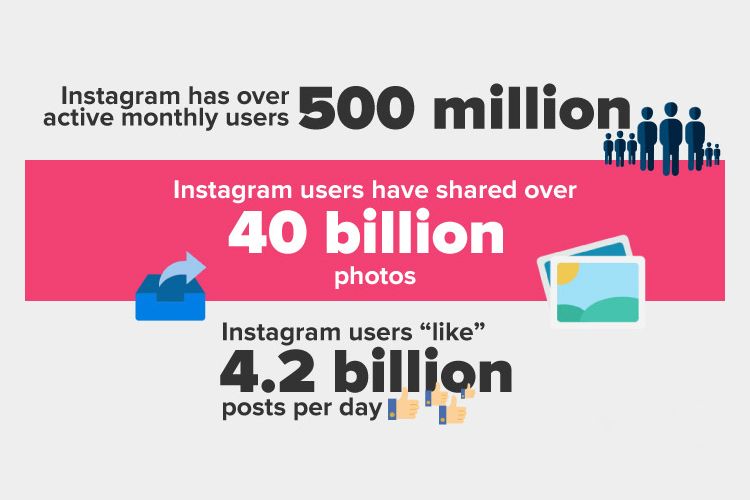
“Instagram shoppable posts have increased traffic by 1,416%”
BigCommerce
5 requirements to set up Instagram Shopping
Setting up this new feature is simple: to get started, you only need to meet 5 requirements.
- You must sell physical products that comply with Facebook’s commerce policies.
- Your business must be based in one of the countries where Instagram Shopping is available. As we mentioned, it hasn’t reached every country yet.
- You must have an Instagram business profile.
- You must have the Instagram app updated to the latest version and at least 9 posts published on Instagram.
- Your business profile must be linked to a Facebook catalog through Business Manager.
The first three steps are the easiest to implement, but the last one is where you may have the most questions.
Make sure you meet one of the following requirements:
– Have a shop set up on your Facebook page.
– Link your product catalog in Business Manager, whatever platform you use.
When creating your catalog in Business Manager, there are modules or plugins that can help.
Once you’ve met the main requirements, all that’s left is to wait for Facebook to review everything and activate Instagram Shopping for you.
How long does it take for Instagram Shopping to appear?
Once all the steps above are done, we have to wait for the social network to activate the new feature. Instagram is rolling out this service gradually, so this step can take about three days. Once Instagram activates it, you’ll see a notification on your profile.
And the new feature is live! How do I start selling my products on Instagram?
How to tag your products on Instagram
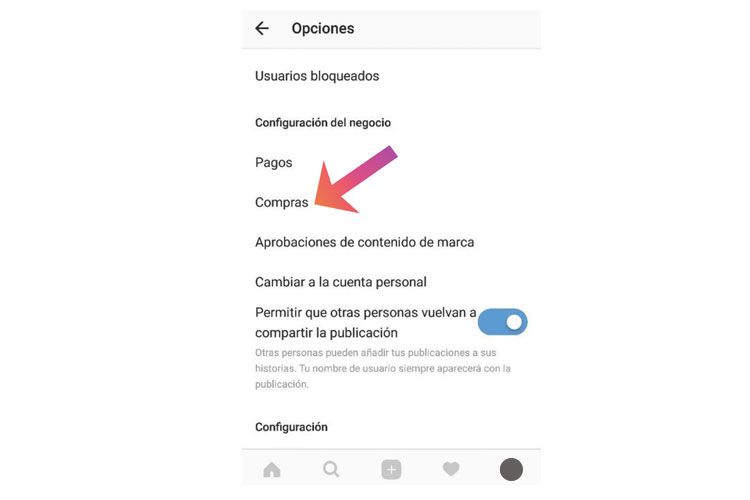
Once the new feature is active on Instagram, go to Instagram > Business Settings > Shopping and simply check the box to connect your catalog and start using shopping tags to tag products in your posts.
Once everything is set up, we can tag products in Instagram posts by following these steps:
- Select a photo, add a caption, effects and filters, and tap Tag Products on the Share screen
- Tap the products in the photo that you want to tag (up to five)
- Enter the names of the products you want to tag and select them from the list that appears
It’s important for tags to sit directly on the related product. When users tap a tagged product, they’ll see the product image, a description, its price and, finally, a link to your website to complete the purchase.
You should also let users choose among several products. Offering a range is key so users find exactly what they’re looking for or discover your store’s most popular items. This will help prevent cart abandonment down the line.
TLG tip: don’t forget to engage customers in these posts in a timely way. Replying to comments creates positive experiences. Use Instagram Stories to promote the posts, showing product details your users will find very useful.
At TLG Commerce, our eMarketing department is here to help you define your Instagram strategy and actions.
Are you ready to start selling with Instagram Shopping?