Imagine we have a tool we believe is useful and will help us improve sales. Imagine, too, for a moment, that we can use that tool on a competitor’s website and “compare ourselves” to see who’s better. Who wouldn’t want something like that? But this completely imaginary situation comes with something very real, very human, very us: we buy a new tool, take it out of the box and start using it…
“Instructions? Nah, they’re not for me. I know how it works.”
– A human
Now imagine Google Page Speed Insights is that tool. Imagine it’s a speedometer to see who’s fastest, who crosses the finish line first.
“I’ve seen that my competitor’s website is better than mine!! Google says so!!”
– A human with a website
If you work in web layout and/or online marketing, this will sound very familiar. You’re not imagining it 😉 It’s happened to me too, which is why I decided to dig a little deeper to understand the tool and see what we can do to improve our results with it.
Since I don’t know how the tool works internally or what criteria it uses for testing, I’m going to dive right in with a series of tests to figure out what it expects from a website. So as not to bias my opinion, I’ve decided not to look anything up online or read the official documentation (instruction manual? Nah!) and to do this testing “blind.” I think it’s more fun that way.
NOTE: This post is based on true events. Everything you’re about to see really happened, in exactly the order it’s written.
Test / comparison conditions (first conclusion)
The whole analysis is based on comparing a real website with a clone of it, hosted on the same server under the same conditions: same data as the real site, same code, same active plugins, etc. In theory they’re the same website.
With this setup, I run the first Google Page Speed analysis on both sites and get the following mobile result:

NOTE: the result on the left is the real website, the one on the right is the cloned website I’ll be experimenting on. This will be the case throughout the post.
Since the tool runs a fresh analysis and calculates on the fly each time, I run them again to make sure we’re on a level playing field, more or less… and this is the result I get:

As you can see, the results are very similar in both cases.
NOTE: if you run it again immediately, it returns the last cached analysis, so make sure to switch away from the page and wait a while or analyze another URL
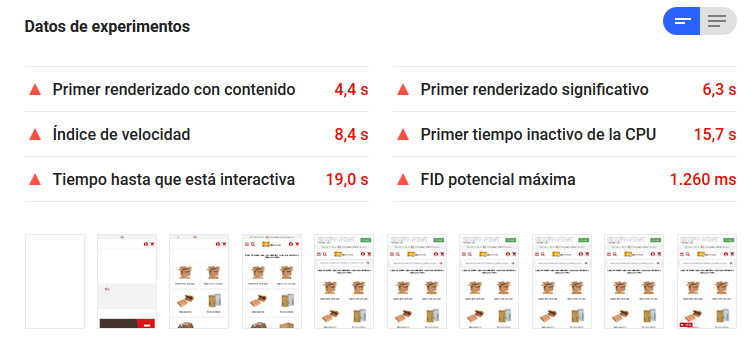
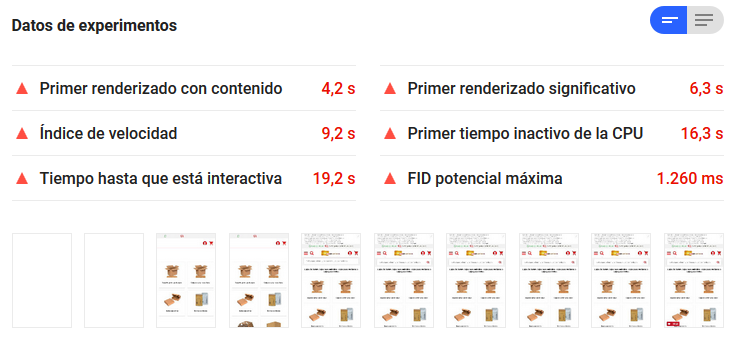
From this last test I also extract the main data for the experiment, which look like this:
REAL WEBSITE
CLONED WEBSITE
So as not to stop at the homepage, I also analyze a page with little content and mostly plain text, such as the legal notice.
With no reasonable explanation, this is the result:


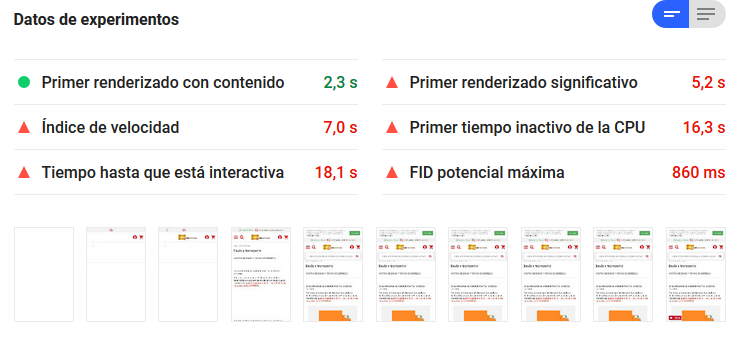
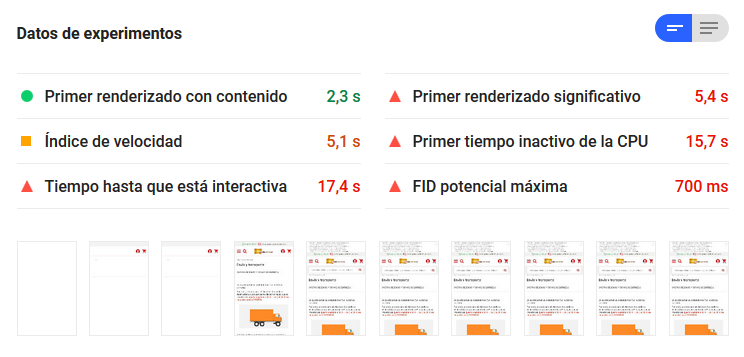
Yet the rest of the analysis data are very similar:
REAL WEBSITE
CLONED WEBSITE
I run the analysis on both pages again, and this is the result:


First conclusion:
This tool is less stable than an internet connection in China
The case at hand
The website I’m using for the analysis is the very opposite of minimalist. It isn’t clean, it doesn’t breathe… and if there were a gap anywhere, we’d still see if we could fill it with another banner… and if things move a bit, even better…
It reminds me a bit of this:

Currently, besides its own requests and those to our CDNs, this website makes requests to 18 external domains to collect data and/or use third-party tools for chat, metrics, smart search and “marketing automation,” among others…
One of our first suspicions when we set out on this analysis was that the tools built into the website could interfere with the test result depending on how they were implemented and/or by their very nature.
Now I’ll gradually disconnect tools and JavaScript tracking codes on the cloned website and again compare both sites at the same moment.
Smart search
First, I choose to disable this tool, which works as a JavaScript plugin on the store. I check that the cloned site no longer sends requests to the search tool’s domain and then analyze both sites at the same time.
This is the result:

Since I can’t believe my eyes… I run it again:
(Logbook. Day 1. Note 1. I’m going crazy. I don’t know if I can take this one more minute…)
Since I’m blown away, I run it again:

(Logbook. Day 1. Note 2. This job is definitely too hard for me…)
Second conclusion:
This tool is as credible as a politician on the campaign trail
And this analysis could end here… I don’t know if it’s worth wasting more time on something that isn’t reliable… Still, I give it one last chance and try again… and this is the result:


(Logbook. Day 1. Note 3. I really don’t know why I keep going with this… I’m seriously rethinking my future…)
Oh come on, one last time and I’ll stop… final result:

So I don’t keep banging my head against the wall, I’ll do what Clemente’s teams did, “kick it long and move on,” and assume the change hasn’t improved the cloned site’s results compared with the original.
Ratings and reviews
Next I disable the plugin that lets shoppers leave reviews about the website and their purchases. I check that the cloned site no longer sends requests to that domain, and then analyze both sites at the same time.
This is the result:
Unbelievable… I remove things from the cloned site and the real one “improves”… I had to double-check I wasn’t disconnecting things in the wrong place… but no…
(Logbook. Day 1. Note 4. I should have taken the blue pill, I’d be much happier in a fake reality…)
I try again, and this is the result:
And one last time:

And so I don’t go any crazier… I’ll carry on as if I hadn’t seen a thing…
Social media metrics
The next disconnection concerns metrics for social media traffic and conversions. I check that the cloned site no longer sends requests to the social network’s domain, and then analyze both sites at the same time.
This is the result:

And right now I feel like this:

I run both tests again:

(Logbook. Day 1. Note 5. If I don’t make it out alive, tell my family I love them…)
At this point in the experiment, the cloned site has slightly reduced its requests and page weight.
Onward! (What choice do I have…)
General metrics
Now I’m going to disconnect a general metrics tool (not Google Analytics). I check that the cloned site no longer sends requests to the tool’s domain, and then analyze both sites at the same time.
This is the result:

It must be rush hour at AWS right now…
I’m going to try again… I don’t even know why… but I do:

Ignore it… moving on…
Marketing automation 1
Now I’ll disconnect the first marketing automation tool, one of those that do everything on your website so you automatically sell more and get more customers and more of everything… Promise!
I check that the cloned site no longer sends requests to the tool’s domain, and then analyze both sites at the same time.
This is the result:
And, still not knowing why, I run it again:
(Logbook. Day 1. Note 6. I hear nothing, there’s only silence… I see nothing, there’s only darkness…)
Marketing automation 2
Now I’ll disconnect the second marketing automation tool, which is also one of those that do everything on your website so you automatically sell more and get more customers and more of everything… but better… or not… What do I know?
I check that the cloned site no longer sends requests, and then analyze both sites at the same time.
This is the result:
It must be a mirage… an oasis, it has to be… I try again:
Money can’t pay for this… I’ve seen gentler torture… there was no need for this…
At this point, the cloned site has dropped about 40 requests and a couple of MB in weight compared with the original (although the transferred size hasn’t dropped as much)
More general metrics
I check that the cloned site no longer sends requests to this tool, and then analyze both sites at the same time.
This is the result:
More of the same… I’ve been disconnecting things for a while, I swear… but I’m right where I started… I’m beginning to suspect I’m looking in the wrong place…
I run it again:
Do I believe it? Or don’t I? My gut says no, the evidence says no, life says no… so why believe it?

(Logbook. Day 1. Note 7. I’m seriously considering death as the solution to all this…
In the event of a murder trial, this should be considered a mitigating circumstance.)
A strange force inside me pushes me to run the test again:


I refer you to the first two conclusions for my opinion on what I’m witnessing.
Chat tool
This website uses a well-known chat plugin to offer this feature and serve its customers. I disconnect the tool, check that the cloned site no longer sends requests, and then analyze both sites at the same time.
This is the result:

Holy crap! (pardon my French) I’ve broken the psychological 40 barrier 🙂 Just like with age, that’s where life really begins… but… should I believe my eyes? Or is it still a Google Skynet hoax to distract me?
God (I mean… Google), if you’re messing with me, you should know it’s not funny at all.
My sanity is at stake, and this isn’t helping.
(Logbook. Day 1. Note 8. Mental note: start using Yahoo as my search engine)
Once again, I run it, just in case. It’s not that I don’t trust it… you know…

And… one last time:

I know I shouldn’t get my hopes up… but I like what I see… who could resist? After all, sight is the most influential of the senses… I’ll clean my glasses, just in case…
Out of curiosity, I run it once more:
(Logbook. Day 1. Note 9. What’s that light? It’s drawing me in… I can’t resist…)
Current situation after disconnecting third parties en masse
At this stage of the test, only Google-related trackers remain on the site. Page weight and transferred data have dropped considerably, and the site loads much lighter.
Although I don’t believe any of it, since the tool has proven very erratic, disconnecting the chat tool seems to have brought some stability to the results, with the cloned site improving over the real one (and over its own initial results)
NOTE: I should say that at this point the test takes about half as long to run on the cloned site. (Which makes sense, I suppose…)
Google Tag Manager
Inside GTM we have Analytics, Google Ads and the other related tools.
I disconnect the tracker, check that the cloned site no longer sends requests to any Google domain, and then analyze both sites at the same time.
This is the result:


It looks consistent, within its random chaos…
A comparison from another angle
And since I’m starting to believe what I see, despite past bad experiences, I want to confirm it in another scenario. So I’ll retest the low-content pages I analyzed at the start, but in this new setup:
And this is where I’m once again amazed by the tool’s scientific rigor…
Umm… does anyone have an explanation? Why so much pain?

What have I done to the world? Why me?

Despite the real site’s result, this is closer to what I expected to find…

It looks consistent… although once again the real site has dropped well below what was expected… though with this tool, I no longer know what to expect…
I’ll test the homepage again and see what I get:

It’s just as I left it… As if nothing had happened… As if the tool knew what it was doing…
Reconnecting everything
If we trust the results, the clearest conclusion would be that the chat is the third party that most affects the result when third parties are disabled.
I’ll try to confirm whether this conclusion is correct. To do so, I’ll reconnect everything I disconnected except the chat tool. We’re back to figures similar to the start in terms of weight and requests.
And I test it:
WTF? Seriously… this isn’t normal… let’s see, again:
Now this looks more like what I expected… But who can trust this?
Well… one last time…
What if we go back to the start? (third conclusion)
I reconnect the chat tool to return to the initial setup.
And I run the tests:

(Logbook. Day 1. Note 10. The hallucinations are back…)
The real store’s result is absurd… so I run the test again…
I can’t use the word “normal,” but this is closer to what I expected…
Well… it seems clear then… even so, I disconnect it again from the cloned site and test:
Suspicious… The expected result on the first try! Let’s see… again:

Why, chat tool?! Why?!! You were supposed to be here to help me!!
I can’t believe it, I give up… I have to try again, I can’t live without you!!
So, after my dramatic performance, here’s the third conclusion of this study:
Third conclusion:
Using certain chat tools on your website is like driving a semi truck to work:
You’ll get there… but… at what cost? And… where will you park?
What else can we do?
Okay, that chat tool is the devil, and that’s been proven. But are we going to settle for that?
Clearly, apart from the chat, the other third parties interfere with the result to an extent that can be disregarded in an optimization study.
So, on to the next experiment.
The best we can hope for? First experiment
The first thing I ask myself is: how far can we go? 99? 100?
This first experiment involves leaving the store code “empty,” so it loads all the common JS and CSS our system needs to run, along with the store’s own code, but renders nothing.
The result is a blank page with all the trackers and the common CSS+JS base. At this point, the chat tool is the only one that isn’t active.
And the test result is surprising:
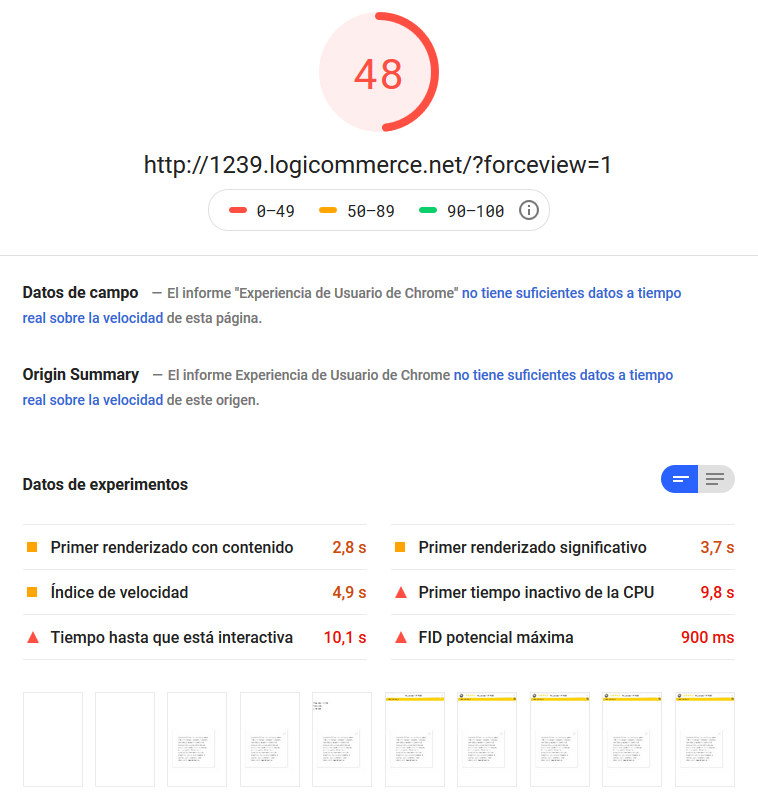
I run it a couple more times, since it’s already been proven that averaging the results is the way to go…


I wonder what percentage impact the trackers still connected have now. So I set out to disconnect them all again. ALL at once.
Weight and load times are now at a minimum… And the result is still surprising… it’s not a 100!
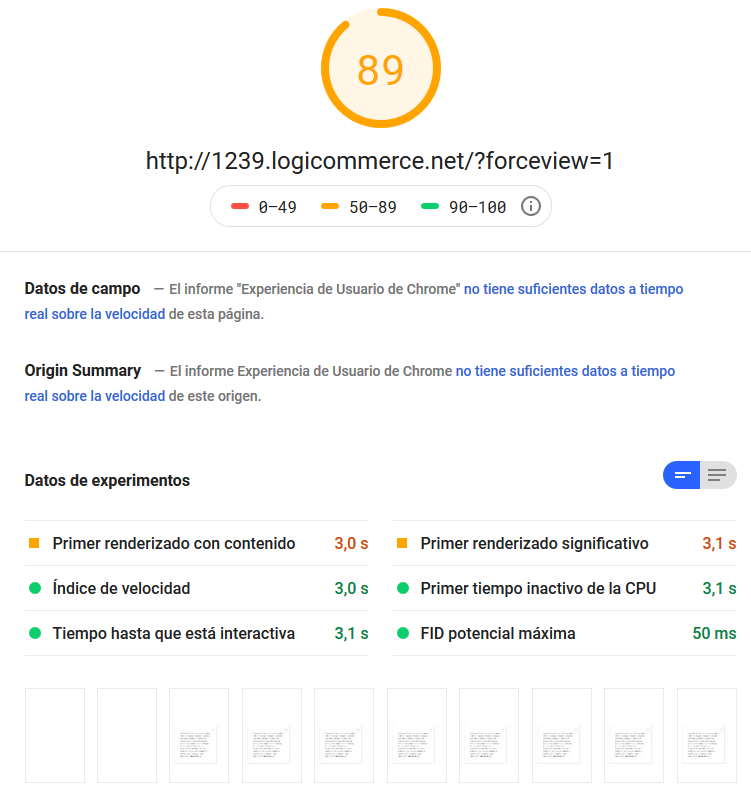
Second experiment
So I decide to take it one step further… I remove the store’s cookie policy and GDPR setup (which displays content dynamically with JavaScript) and put in some plain HTML “content.”
The result is a website that neither reads nor creates cookies and renders plain text directly from the HTML instead of via JS.
I want to believe this is the minimum we can get from a “store” built with our system (even if it isn’t realistic)
It would be the equivalent of having an HTML file on the server and reading it, but going through our server language, creating a user session and all the other necessary processes.
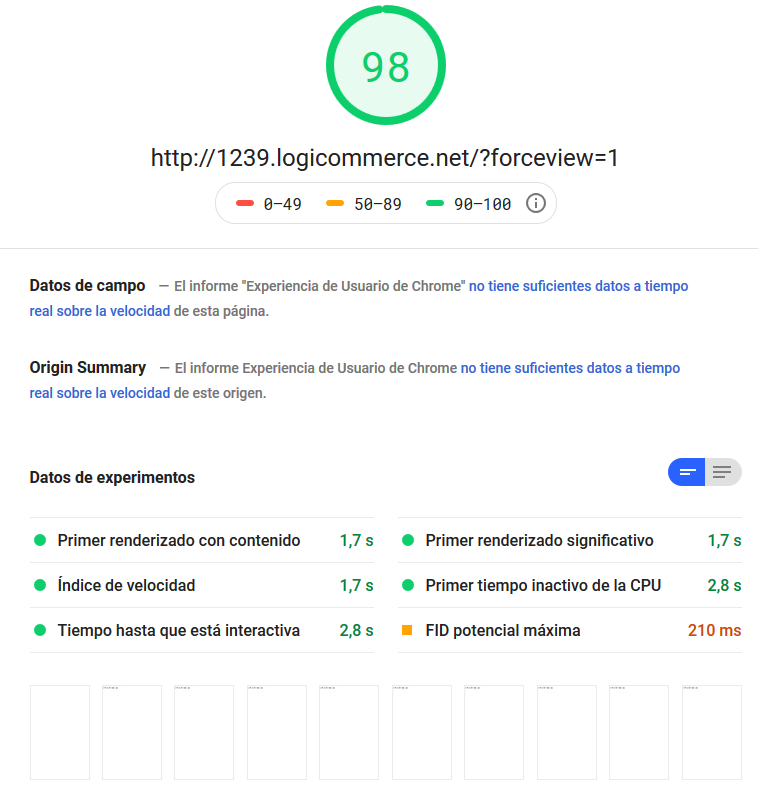
(Logbook. Day 1. Note 11. Twice nothing is nothing… that’s what Google has taught me)
But is this good for anything? Well, we’re closer to something… whatever it is…
Third experiment
To rule out web server and/or database processing times as a factor, I create an HTML file with the same content as the dynamically rendered page and run a test on it.
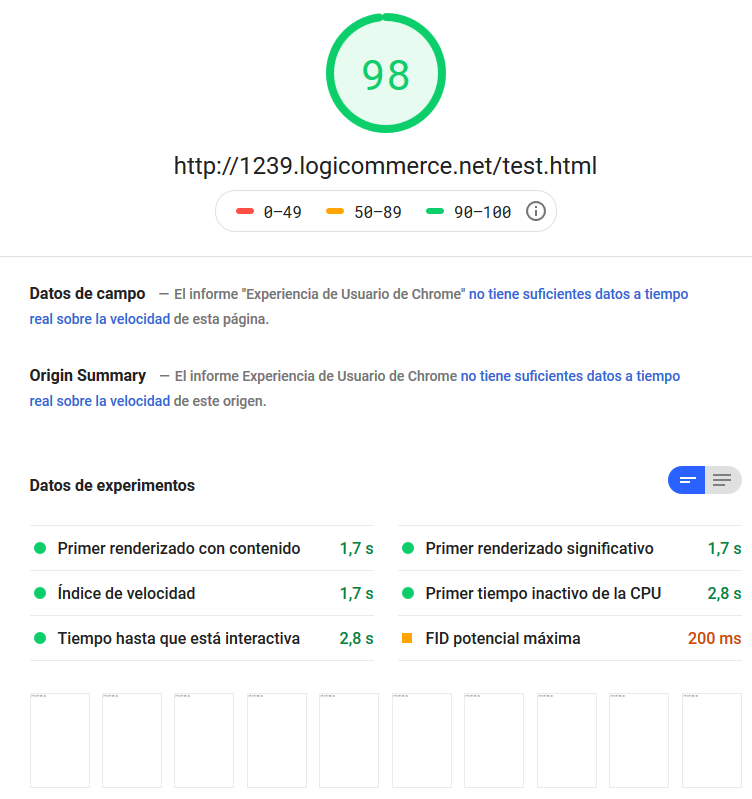
The result is almost identical, except that in the screenshots we already have rendered “content” from the very first one.
Which makes me wonder: why does it say it takes 1.7s to deliver the first contentful paint if it’s plain HTML?
So I remove the JS loading and try again.
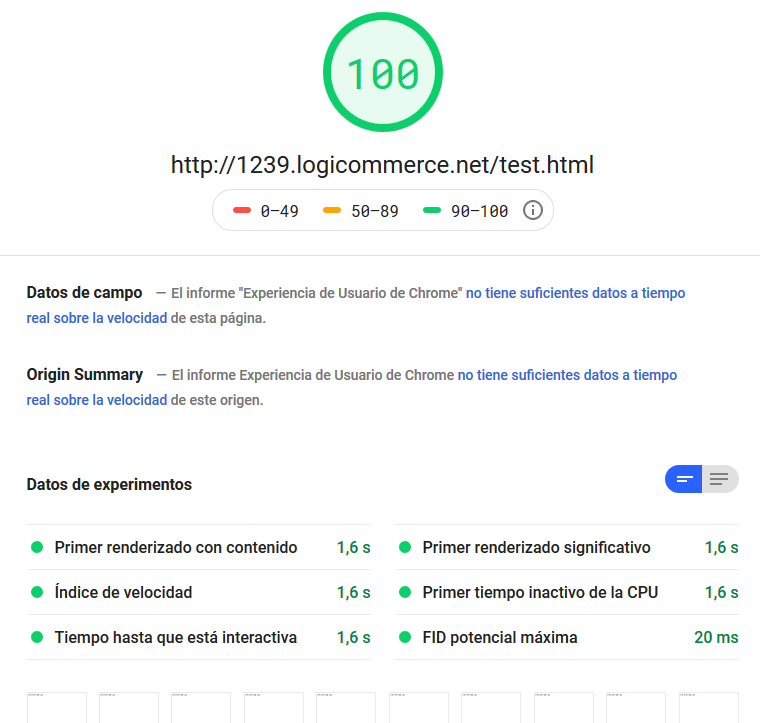
Okay… 100… But the tool took 1.6s to render??
And without CSS??
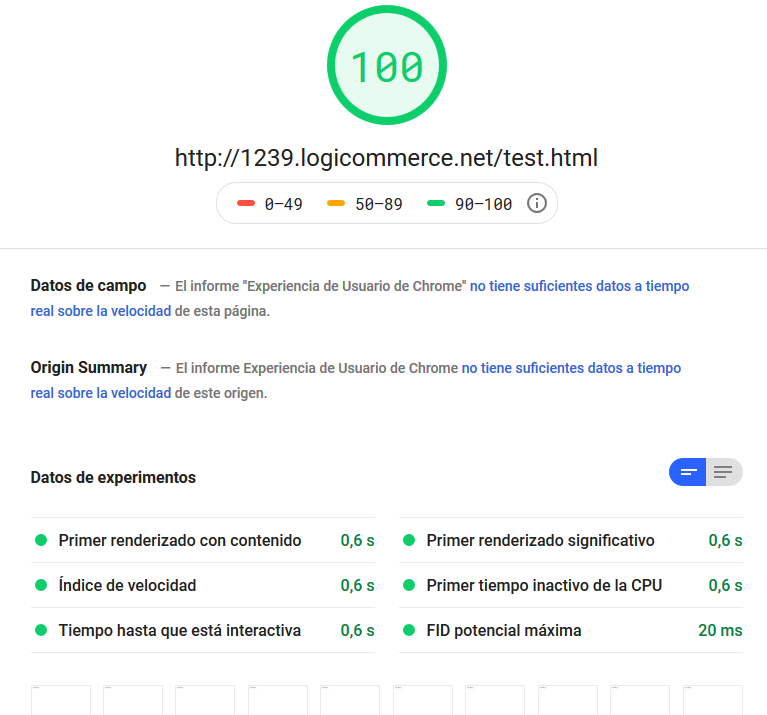
Wow, that’s fast… but personally, 0.6 seconds to render a practically empty HTML page seems like a lot… I take it this is the “minimum” time we can aim for with this tool…
And while we’re at it… with JS but without CSS?
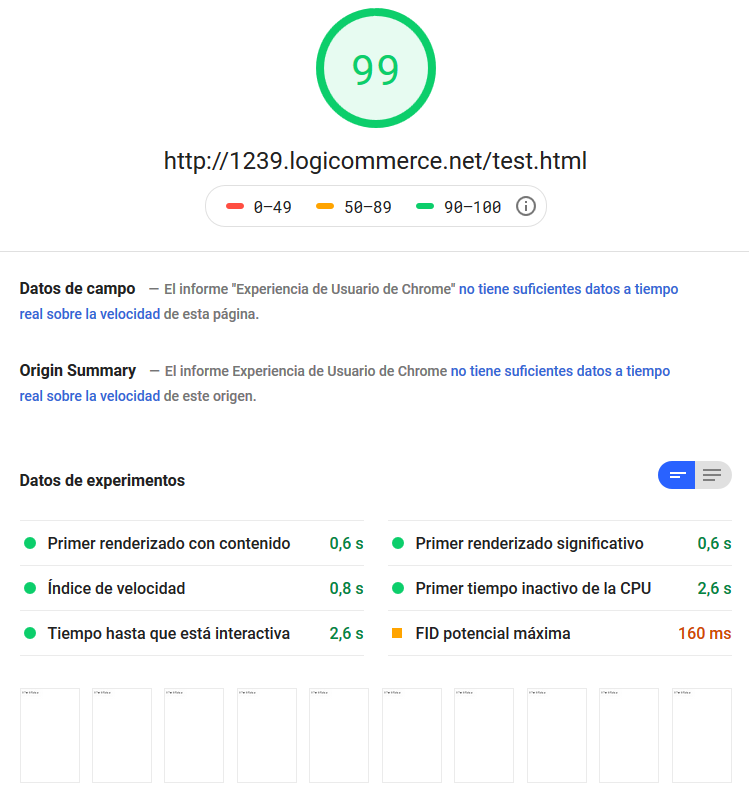
It takes the same time for the first render, but 2.6s to become interactive.
With this I have enough information to move on to more “realistic” tests.
Now the same, but the other way around
Okay, I’ve reached the lowest common denominator. Now I need the greatest common multiple.
(Logbook. Day 1. Note 12. Okay… I’m delirious again… I should stop before it’s too late…)
I’ll restore the homepage as it was and gradually remove elements to see what impact they have. Remember that at this point the site has no trackers or JavaScript tools built in.
The only thing I can’t remove is our common JS and CSS code. In the previous experiments we saw the minimum to expect in this case:
- 1.7s to first render
- 2.6s to interactive
Fourth experiment
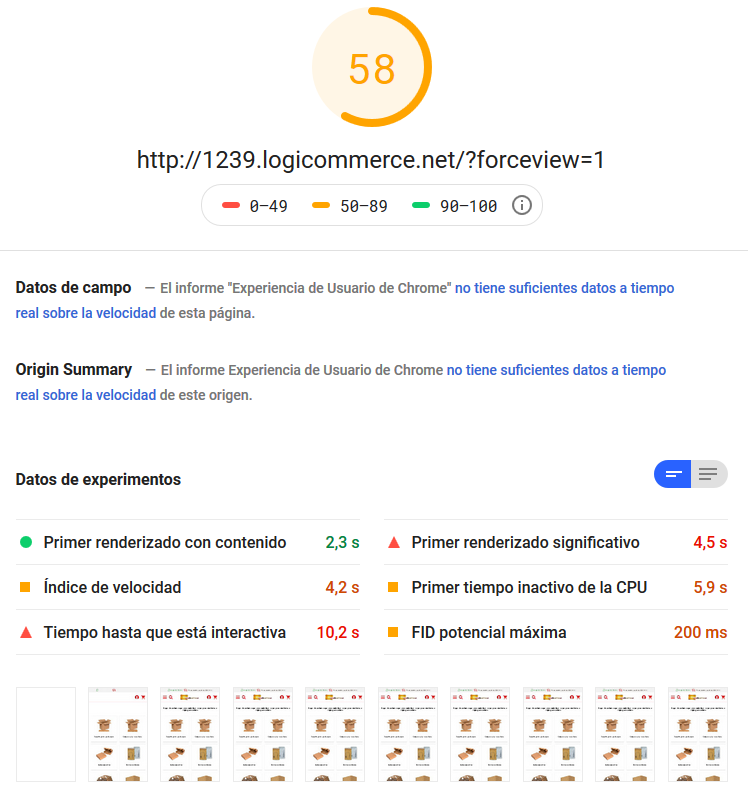
I remove all the JavaScript that comes from the store itself. That way the site is complete, but only has the JS from our common system engine.
And this is the result:
Fifth experiment
I remove all the CSS and also the JavaScript coming from the store. That way the site is complete, but only has the JS/CSS from our common system engine.
And this is the result:
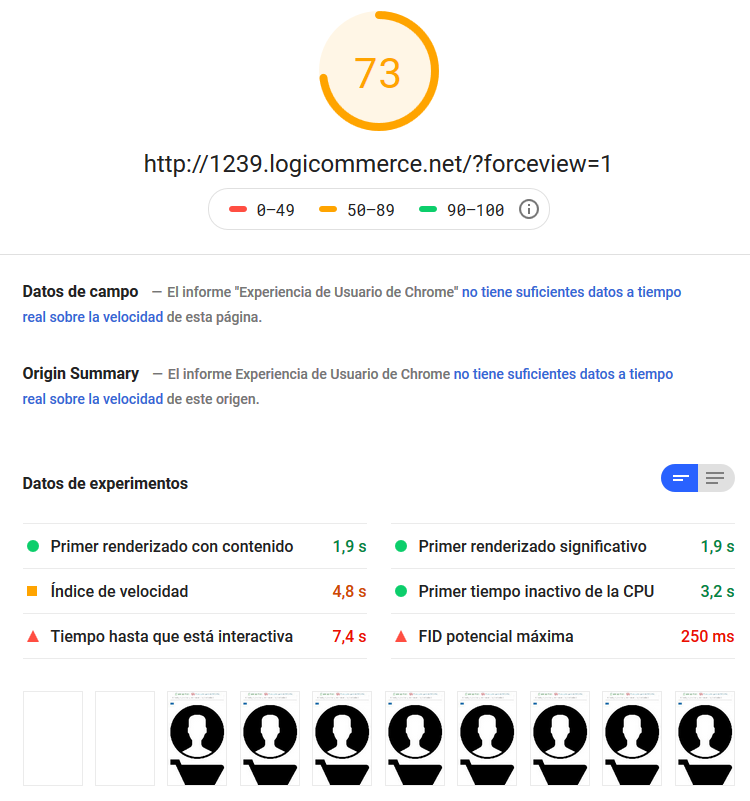
Not bad at all either… but… something doesn’t add up…
Comparisons are odious
At this point I remember we have a demo base code that we build stores and experiments on. Clean but complete, functional code.
I set up a new environment with a store running that code so I can test it with this tool. And…
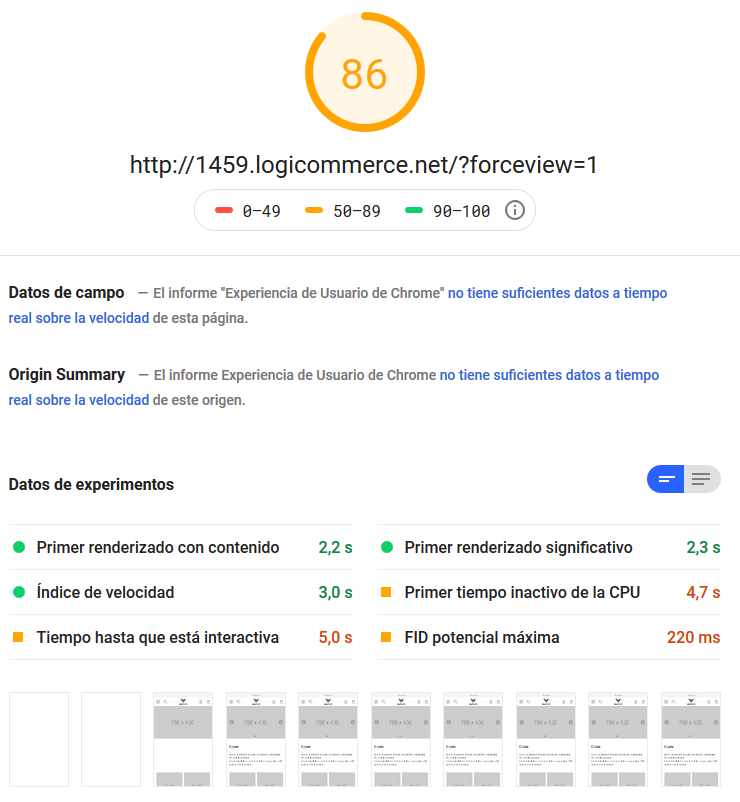
This site also loads CSS and JS from our common engine. It also has its own CSS and JS, also runs actions when the DOM is “ready” and has dynamic elements… So? What’s going on?
The harsh reality (sixth experiment)
Having made it this far still sane, which is quite an achievement, all that’s left is to put the icing on the cake with a grand finale: dramatic, exciting, with a touch of suspense and, above all, “revealing.”
What if the culprit is… the design!? Well… responsive design! Well… not exactly… or yes… Not the concept, but how it’s “understood” in many cases and where clients push us…
(Admittedly, Google’s tool has a curious way of measuring, which I’ll try to explain later with some conspiracy theories)
And to try to prove it, the best thing is to run another experiment, like this one:
The website I’m analyzing has a complex mega menu. So complex that its “mobile conversion” isn’t possible because the hierarchies are very different. (It takes up about 700 lines of HTML and loads 54 images)
So the site actually has 2 menus, and one or the other is shown depending on the device. This means that on mobile, all the HTML, images and everything else from the desktop menu are loaded even though they aren’t used.
What happens if I remove the desktop menu from the code? At this point, the code contains all the JS and CSS, except for the plugins and the chat tool.

Suddenly the mobile rendering engine seems lighter, fewer images and less HTML are loaded, and the result is better.
I got a better result than without loading any JS on the site…
(Logbook. Day 1. Note 13. I can no longer tell good from bad, so everything is good)
The ultimate experiment?
From here, all I can do is go back to building an HTML file from the dynamically generated result, to try out changes that might optimize the result so far.
I start from the previous experiment (site with no chat, no trackers and no desktop menu)
First of all, I check that the result is still as expected:

Part 1
Move all the CSS to the very end of the code:
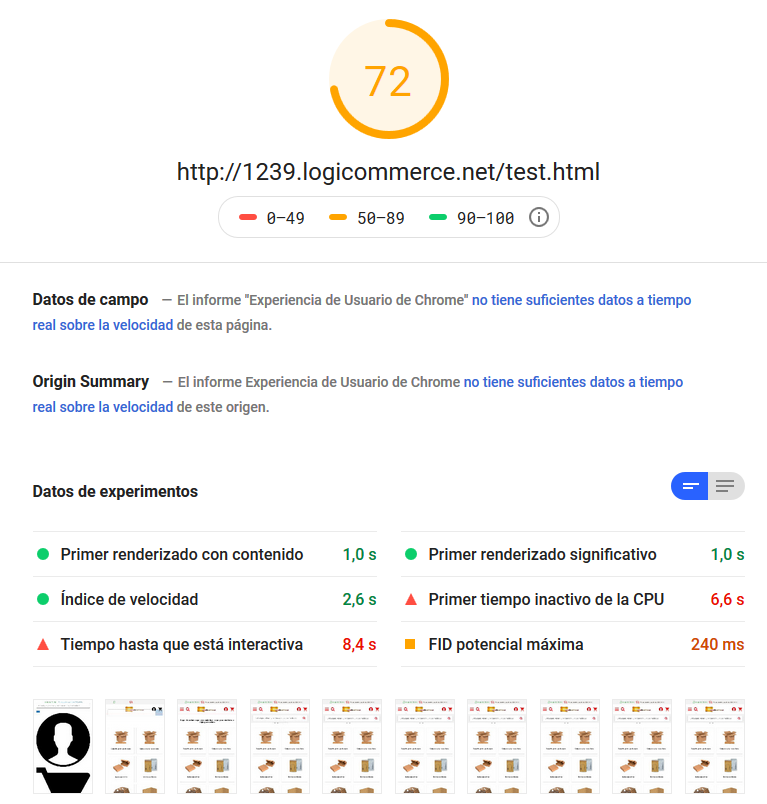
The result improves, but at the cost of the site spending a bit longer unstyled and looking “a little ugly.”
The first render is fast; everything else stays as before.
Part 2
Make the CSS calls asynchronous
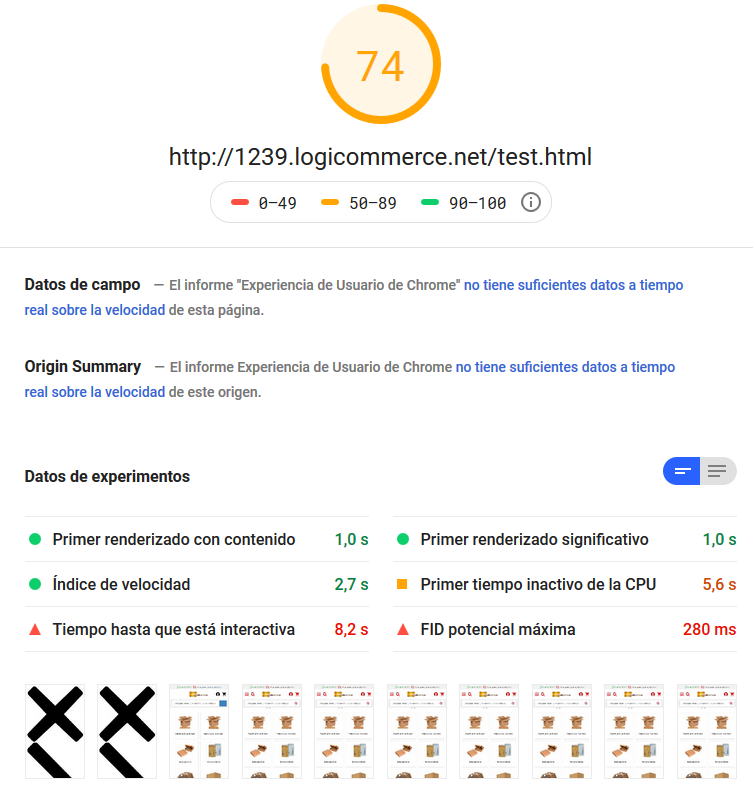
The result improves slightly, but at the cost of the site spending a bit longer unstyled and looking “a little ugly.”
Part 3
Make the JS calls asynchronous
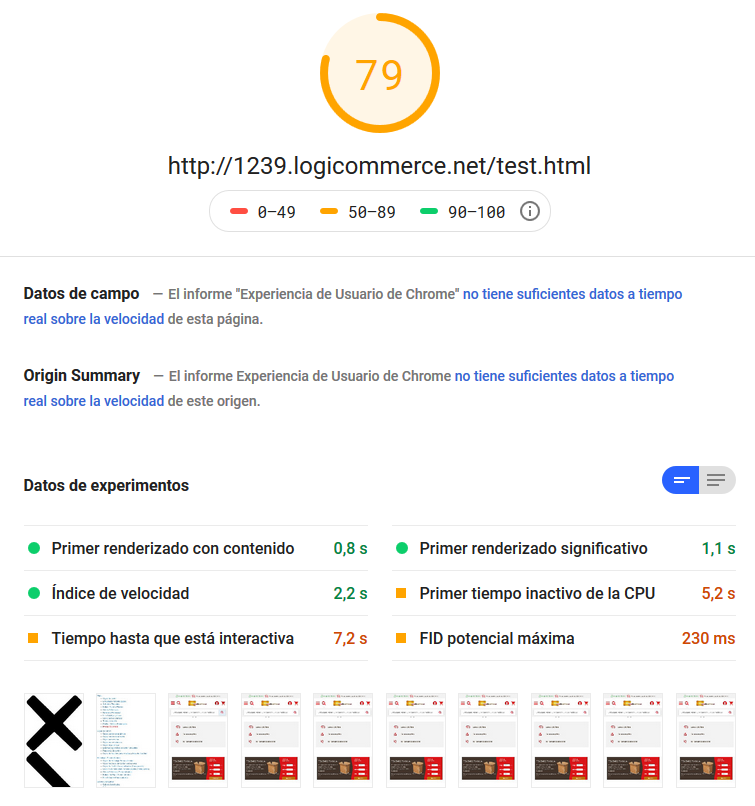
Once again, the result improves slightly, but at the cost of the site spending a bit longer unstyled and looking “ugly.”
Part 4
And what if I add the chat back on top of all this?? I’ll try it a couple of times and see…
Lucifer!!!! Get away from my website!!!!
Back to reality (fourth conclusion)
During this odyssey through the cyberspace of load speed, we may have lost touch with all reality. That’s normal. It’s what Google would want.
(Logbook. Day 2. Note 1. I didn’t come this far for nothing… future generations will value all this…)
With everything we’ve “learned” so far, which is quite a lot, we just need to get back to reality. What can we do to improve the score of the site we’re analyzing?
Once again, all I can do is go back to building an HTML file from the real site’s output, to try out changes that might optimize the result.
This time I start from scratch. That is, the site has all its trackers and plugins, chat included.
First of all, I check that the result is still as expected:
So far so good, no “surprises.” The tool is doing what it’s supposed to, which is a welcome change at this point…
I’ll put the CSS at the very end and see what I get. I try it a couple of times:
What’s going on? Was yesterday April Fools’ Day or something? Suddenly the tool has decided to be “stable”…
Obviously, the aesthetic “problem” of the site not being properly rendered for a while appears, which is “ugly” but could be worked around.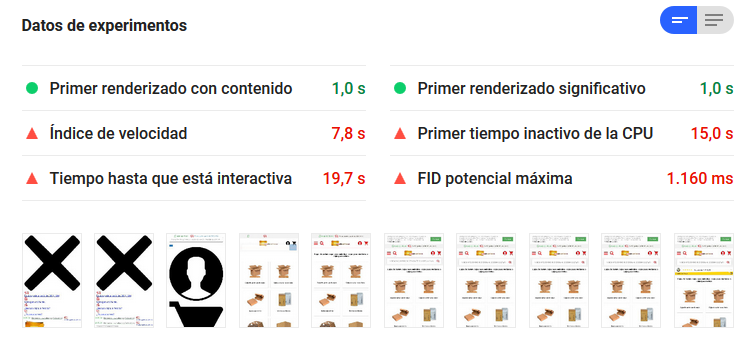
Now I’ll make the CSS calls asynchronous. It shouldn’t matter much once the CSS is at the end of the load, but since it supposedly “scores,” we’ll do it… 🙂
Let’s draw a stupid veil over that…
Now I’ll make the JS calls asynchronous.
Let’s draw another stupid veil over that…
(Logbook. Day 2. Note 2. Every fall makes me stronger… every mistake, wiser… every attempt, more unhinged…)
What if I remove the chat?
What if I remove the desktop mega menu?
WTF?? Have I mentioned I hate this tool? Google… I curse you!
Fourth conclusion:
This tool is like a kid with money in a candy store: it knows what it wants, but it doesn’t know what it wants…
Part 8 – What Google would like…
Okay, I’m going back… I’ll leave the mega menu and everything else as it was… all of it…
Now I’ll do what Google would really like this page to do…
Out with the CSS! Out with the JS!
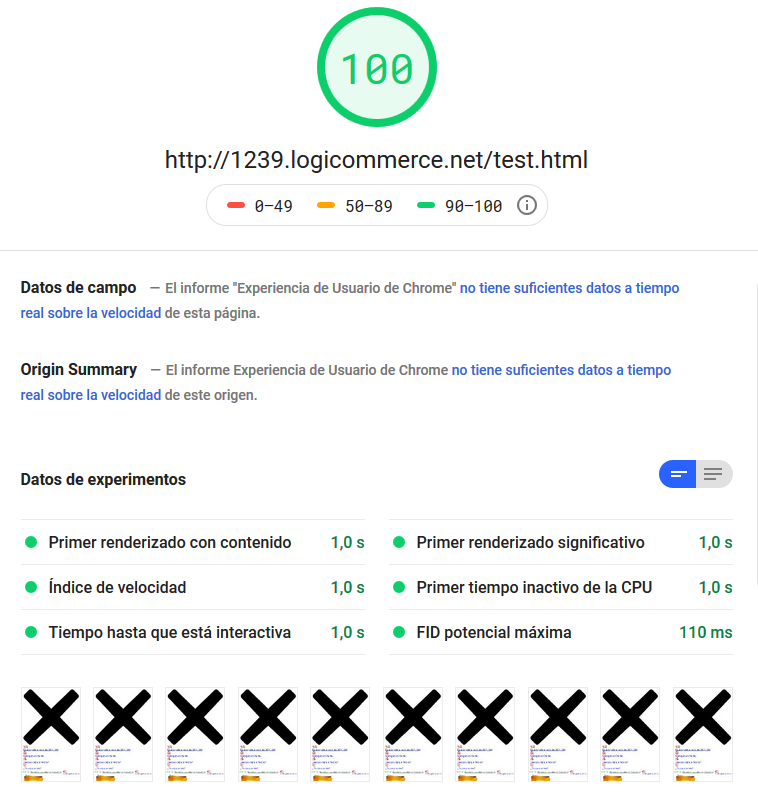
Ta-daaaaaaaa!!!!
Welcome to the Age of AMP Ultron
None of it matters: image weight, number of images, HTML weight… Nothing!! This site weighs almost 2MB and makes 111 requests!!
The only thing that matters is how long the rendering engine takes to make the site available to the simulated user.
It was right in front of us, and we didn’t want to see it…
(Logbook. Day 2. Note 3. They’ve been playing with me… They knew everything from the start!)
From madness to sanity: the commandments
This whole psychedelic trip couldn’t be for nothing. It was essential to learn something… to gain knowledge and be able to apply it. And, above all, to tell the fine line between madness and sanity.
What does this tool expect from our pages?
Simplicity, and for users to have the content available as soon as possible and be able to interact with it. The more complex a page is, the lower its score, unless you try to “disguise” it from the measuring tool.
How do we achieve that?
By sacrificing initial interactivity and site elements to simplify it, and accepting that it may not look right at first. By deferring loads until after the first “user-interactive” result.
A dedicated mobile version would help produce cleaner code for this test and get a better score. Especially if, by design, the site’s responsive layout isn’t “very natural” and many elements are duplicated because they can’t be “transformed” dynamically.
Making that mobile version AMP would help even more.
Are there other alternatives?
As with Google and SEO rankings, this tool has dozens of variables to analyze. It isn’t all JS and CSS, but those are what “slow things down” the most.
Simplifying the site helps, but if you upload two 2MB images, you’ll be penalized… so not everything that can be improved comes down to code.
Proof of this is that the “base” code scores very well, yet it carries all the same base JS/CSS code as the store we analyzed…
Why? Because it’s very simple. As soon as we start complicating a site’s responsive design —mega menu, sticky header, interactive search, dozens of banners + categories + products on the homepage, JS-generated dynamic elements such as popups, cookie consent, etc.— we introduce elements that slow down the tool’s rendering engine.
How on earth does this tool score?
In my view, and this is just a theory, the tool’s job is to give you a score based on the “improvement” it believes can be made in code and resources compared with the result it obtained. Something like: “If I had to build a site like the one I’m looking at, I’d do it this way… and you did it that way… I compare them and tell you the difference…”.
That’s why a horribly heavy, ugly site with no CSS/JS to interpret gets a score of 100. Google couldn’t do it any better! 😀 (Probably not any worse either…)
At this point, I do what I should have done at the start: read the instruction manual. Here’s an excerpt from Google’s official documentation on this tool:
https://developers.google.com/speed/docs/insights/about?hl=es-419
“PSI checks to what extent a page follows common performance best practices and scores it from 0 to 100, a rating that roughly indicates its performance headroom”
And further: “The optimization score is a rough estimate of the performance headroom of a page”
And to finally prove that this tool doesn’t measure our site’s speed and isn’t an indicator of whether other sites are faster than ours:
“A slow page may have a high optimization score because the ratio of render-blocking resources to the page’s total resources is low. The opposite can also happen: a fast page may have a low optimization score because it has many render-blocking resources relative to its total resources”
Phew… if I’d read the manual before starting, I wouldn’t have gone through this ordeal…
But why are the results so different for the same test?
My theory is that, depending on when you run the test, the server running it takes more or less time to execute it and, in some cases, to reach all the domains it has to request, and that ends up blocking load time… But it’s just a theory…
Another could be that the test actually does nothing and spits out a random number based on total load time… That’s all… xDD And that behind it all there’s a toy monkey clapping cymbals…
Should I pay attention to this tool?
Yes and no.
What did you expect? After the madness I’ve been through…
It’s important to at least take a look and check we haven’t made mistakes that penalize us needlessly. Very heavy images, techniques that could be improved…
But at the same time, it’s important not to obsess over the results. After all, it isn’t a stable tool. And its result depends on variables that are often outside your control.
So you might ask: is it worth investing to get a better score?
And once again my answer is: it depends. To fix a disaster, obviously yes. It’s a sign something isn’t quite right. To beat others: obviously not. In that case you’re not comparing like with like.
And finally, let’s not forget: improving your homepage score won’t change the score for the rest of your site. Google is experimenting with using this tool across your site’s navigation, ALL of it, not just the homepage.
So if you want to focus on something, aim for structural, site-wide improvements that genuinely optimize your website, not just to stay “ahead of others.”
A bit more reading to wrap up
Now that I’ve drawn my own conclusions, I looked around to see if anyone else had reached the same ones. Here’s some further reading, if you haven’t had enough:
- The big lie of Google Page Speed and your website speed: is it useful for SEO? (in Spanish) https://blogger3cero.com/google-page-speed/
- Why you should forget about PageSpeed, WP Doctor and measuring your website so much NOW (in Spanish) https://hormigasenlanube.com/olvida-pagespeed-wpdoctor/
They’re really interesting, trust me.
(Logbook. Day 2. Note 4. All things come to an end… I hope this isn’t mine)
I hope you’ve enjoyed reading this post as much as I enjoyed writing it. Enjoying something so tedious must be worthy of study.