Google keeps stressing the importance of internet users’ security. About a year and a half ago, it began rewarding sites that offer this security with better rankings. You can see it on the Google Webmaster central Blog: “https as a rank signal”.

Until early 2016 there was a lot of skepticism about how much an SSL certificate could influence a website’s SEO; in fact, Google announced it would only give a slight ranking boost, far below other factors such as quality content. It felt more like good practice than a relevant factor, which is why these certificates were not yet widely adopted. Now they have taken on a new dimension.
Let’s start at the beginning…
What is an SSL certificate, what is it for and what does it stand for?
It’s a security system that encrypts data between server and user, so the data travels intact and secure. This tells users they’re on a safe, trustworthy site where shared data always travels encrypted across the network.
SSL stands for Secure Socket Layer.
Types of SSL certificate
Which type of certificate our site needs depends on two factors. Depending on them, the price can vary a lot, and you can find cheap or even free certificates. The factors to consider are:
How many domains do we want to certify?
- Certificates for a single domain: usually the cheapest. Example: https://www.certificado.com
- Multi-domain certificates: slightly more expensive than the previous ones, but better than buying a separate certificate for each domain. Example: https://www.certificado.com / https://www.certificado.es / https://www.certificado.fr
- Wildcard certificate: when we also want to certify subdomains. Example: https://www.certificado.com and https://m.certiticado.com
What type of validation do we want?
- Domain validation. The simplest and fastest validation. It’s done by email and you can have the certificate within minutes. These are the cheapest and most popular certificates.
- Business Validation. Besides email confirmation, you must submit company documents. Finally, you have to answer a phone call from the certificate issuer.
- Extended validation. The most thorough. It includes all of the above plus much more documentation requested by the certificate issuer. If you want the green bar, you need this validation.
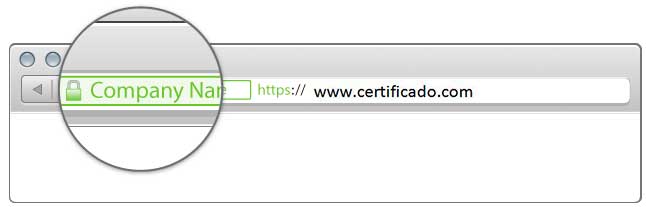
Finally, note that the encryption type, in terms of security, is the same in all cases. What the different validation types reinforce is “who” is behind the store. It’s a guarantee of identity about who actually holds the certificate.
Pros and cons of having a certificate
The best thing we can do in a case like this is weigh the pros and cons of implementing a certificate on any site.
1 SSL certificate and SEO
We referred to this at the start of the post. Google has made it clear that this type of certificate helps any website rank well. Initially it wasn’t a key factor like, for example, good content work and structure. Over time it has become more relevant, as Semrush noted in its 2017 study: 12 SEO factors for 2017
2 SSL certificate and SEM
Google began suspending Google Merchant accounts for sites without encryption on every page that collects personal information. Google extends this practice to all AdWords campaigns, as these are its Google data collection and use policies:
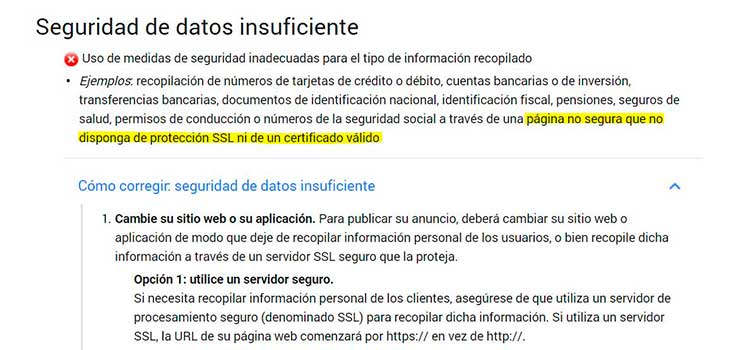
If you want to run Google AdWords campaigns, you need a certificate on your store. Otherwise, any day you may find Google suspends your Merchant account or rejects your ads.
3 SSL certificate and the user
We all know how important a business’s image is in every respect. Here we mean the image of security your customers and prospects perceive while browsing a medium that has traditionally generated a lot of distrust. So anything that offers our users security and trust is more than welcome and will help improve your image and, why not, your conversion rate.
Since early 2017, browsers explicitly flag a site as “not secure” if it doesn’t have an SSL certificate
4 Implementing the certificate
It’s very important to implement it properly at every level. Getting it wrong could have critical consequences; here are a few:
- Handle redirects to avoid duplicate content
- A certificate in itself means longer load times, so it’s important to do a good job to minimize the effect
- SEO. Any change like this causes a “dip”; as above, good work minimizes the effects and ensures a quick recovery
- Review every element of our store, such as plugins and external tools. If those tools don’t also have the certificate, we’ll get a message like: “parts of this page are not secure”
- If you track conversions, you’ll need to make some adjustments in Analytics, since implementing these certificates can cause conversion attribution errors.
For all these reasons, you need to be in good hands when implementing it and rely on professional advice.
Should I implement it on my site?
In summary:
Advantages:
- SEO.
- SEM.
- Security and trust
- User experience
Keep in mind:
- Implement it properly
Besides everything we’ve discussed, ask yourself the following questions:
As a user. If you had to buy something online, sign up on a website or fill in a form, wouldn’t you want to be sure that all the information you provide is transmitted securely over the network?
As the site owner. Do you want to project trust and security to your users and potential customers?
Everything suggests Google wants you to have it, no matter what.
At TLG Commerce we always offer the best advice for your eCommerce. So don’t hesitate to contact us if you need help with your online store.