Before defining Priority+ navigation, here’s a question for you: how many times have we visited an online store on our phone and found that the navigation isn’t fully visible, doesn’t adapt well or is far too big?
The main concern of this post is how to approach mobile navigation in an online store so that it’s usable and easy for our users. There are countless opinions on the subject and plenty of debate about the best solution. We want to explain what Priority+ navigation is and the benefits of using it in your online store.
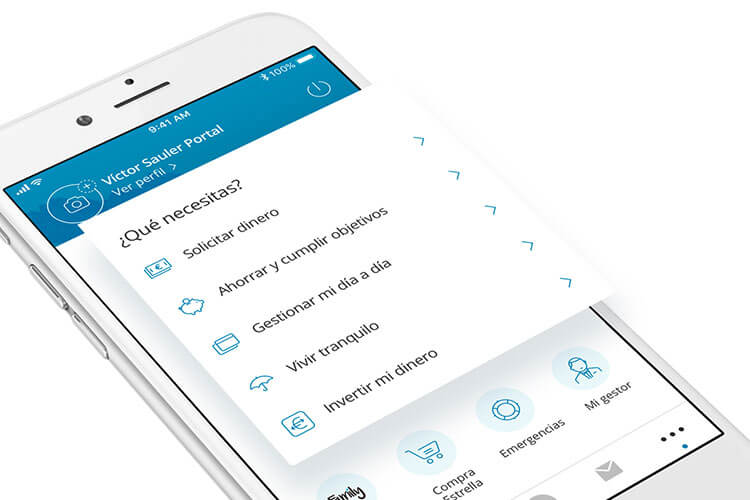
The ‘CaixaBank Now App’ mobile app, recently awarded by the Bank Administration Institute (BAI) for the best user experience, featuring Neo, the first AI-powered chatbot providing virtual assistance to users.
Before explaining what Priority+ navigation is, let’s review the most commonly used types of navigation.
Bottom navigation is a solution that already existed in our apps and organized their sections as tabs. It was undoubtedly an approach that worked.
Mobile applications (apps) are certainly a good example of usability and functionality, as they are designed specifically for small devices. However, an app’s needs and functions differ from those of an online store, so we need to watch out for the problems that can arise.
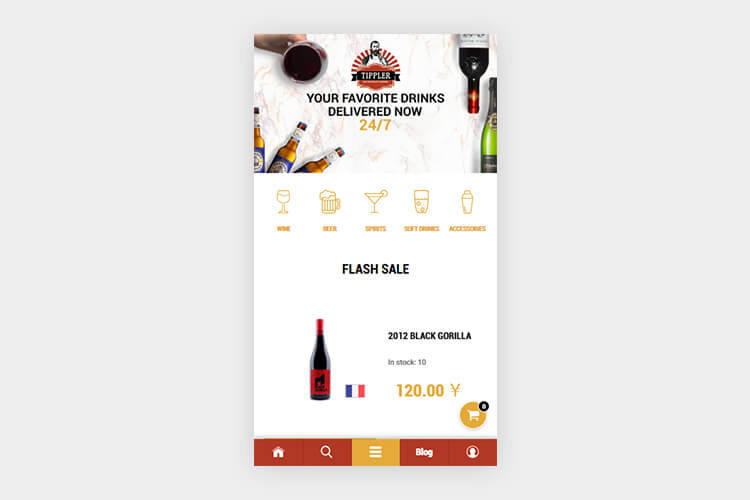
The main drawback is the limited screen width available to display an online store’s sections. For bottom navigation, it’s best not to exceed 5 items. You’ll probably also want to use icons and text. In that case, space will be even tighter and fewer sections can be shown. As you can see, it may not be a good solution for an online store that wants to promote many different sections.
The example below is the China Tippler online store. In Chinese eCommerce, bottom navigation is very common across online stores. On the other hand, many want to move closer to Western aesthetics and are gradually opting for cleaner, less cluttered designs.
So far we’ve covered bottom navigation, which originated in mobile apps, along with its pros and cons. Now it’s time to talk about top menu navigation.
With the arrival of new smartphones, a different navigation strategy was needed that could work across different screen sizes and on smaller, touch-based devices. As a result, a light, minimalist icon that could adapt to all of them was revived: enter the hamburger icon, or hamburger menu.
The main feature of this navigation is the collapsed menu icon which, when tapped, reveals the category menu and other links on the website. Tap it again and it disappears, leaving the page clear of information. It consists of 3 parallel horizontal lines and is usually located at the top left of the screen.
We say the icon was “revived” because back in 1981 Norm Cox had already introduced this kind of hamburger button as part of the user interface for the Xerox Star. But it wasn’t until 2009 that it got the boost we know today.
This icon is now used everywhere. Users have come to associate it with the idea of a menu and know where to find, for example, an online store’s categories. It has become the king of mobile menus.
The aesthetic advantage is that anything we’d rather not show on screen can be tucked behind this icon, leaving a clean, minimalist design. But watch out! It’s also easy to make the mistake of hiding information that matters to users, who will only find it if they open the menu. They won’t know what’s in that section until they’ve explored a bit. In other words, you can end up with a kind of “junk drawer” hiding information we’d want to see more easily. Likewise, people have tried to use this solution on desktop designs, and that, my friends, is a usability mistake! There’s more than enough room there without hiding links behind an icon!
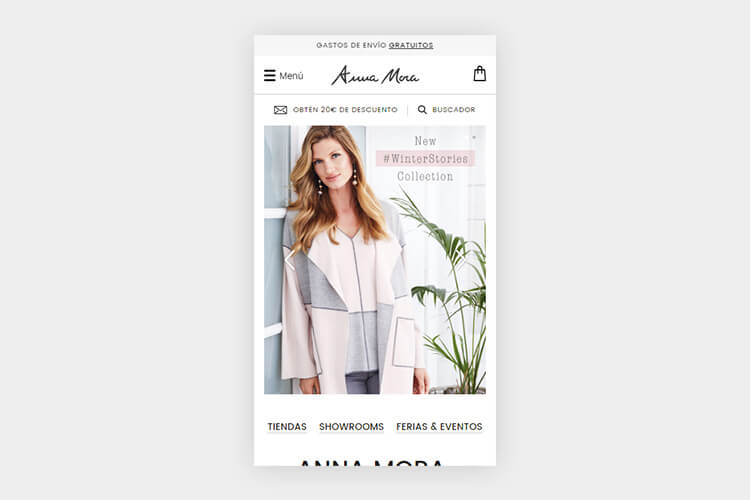
And let’s be honest: we all like things made easy and to be told explicitly what we’ll find behind each icon and what everything is for. For that very reason, some designs add the word “Menu” right next to the hamburger menu to make its purpose clear. You can see this in the following example from the Anna Mora online store:
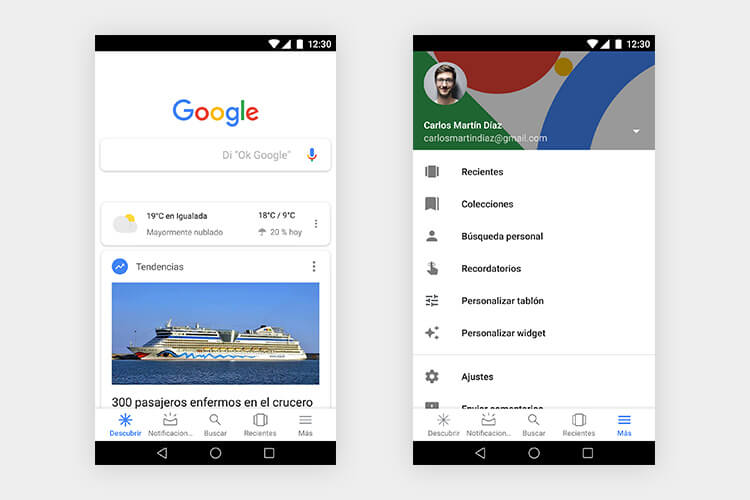
As a result of the drawbacks we’ve seen in the other options, Priority+ navigation is here to stay. This new solution combines the previous two: sections are organized as tabs, with one tab reserved for opening a side drop-down menu (as in top navigation with the hamburger menu).
This navigation lets users find the most important sections at a glance and shows much more content without overloading the screen. It can include other categories and/or relevant links, as well as additional information or contact details. What do you think? Great, right?
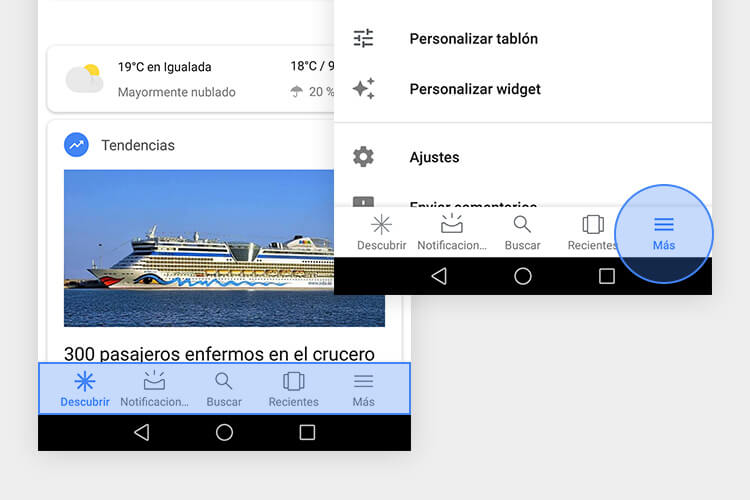
In mobile apps we’ll see examples of Priority+ navigation, such as Facebook, YouTube (the Library tab shows more profile sections that aren’t visible in the tabs) and, of course, Google’s main search page. In the following screenshot we see the tab bar at the bottom and a section on the right labeled “More”. In the second image we see the drop-down of links inside this icon:
It could indeed. This combination gives access to the most important parts of an eCommerce while reserving an area to show other relevant links whenever needed.
This solution can also be applied in countries like China that use bottom mobile navigation, as mentioned earlier. It also adds value thanks to the “extra” section.
We call it Priority+ navigation because some content is prioritized while the rest is left for users to explore if they’re curious. Even so, all that information stays in the same navigation area, never lost, while the user keeps browsing.
It doesn’t necessarily have to be Priority+, and we don’t mean to confuse you (I know what you must be thinking, but there’s an explanation). Here goes. Every online store has its own needs, style, amount of information and categories, and also its own purpose. At TLG Commerce, our designers and Project Managers, are responsible for finding the best solution for each user and type of store.
That’s why each case must be studied carefully, considering how it will be used, who the target audience is and which information should be prioritized.
Priority+ combines tab navigation with the side drop-down menu powered by the hamburger menu. The best navigation will depend on the number of categories in the online store and the client’s goals.
To help you a bit more, here are some general tips to keep in mind when planning your online store’s navigation:
- Choose functionality. Go for solutions that work beyond trends. What’s “in” isn’t always what’s right.
- The simpler, the better. Not every audience uses a mobile device the same way, but it’s always wise to design for the least experienced user. That way you’ll make sure far more people know how to use it.
- Show the categories. Whenever possible, keep links to the most important categories visible.
- Define what users will see at every step. Whenever you can, make clear what users will find as they browse.
- Be deliberate about the option you choose. If you prefer a minimalist design and want to use the hamburger menu, make sure the content inside it is also available elsewhere on the page and, in any case, don’t overload it with information. Have your icon hold one “type” of content and avoid mixing different topics.
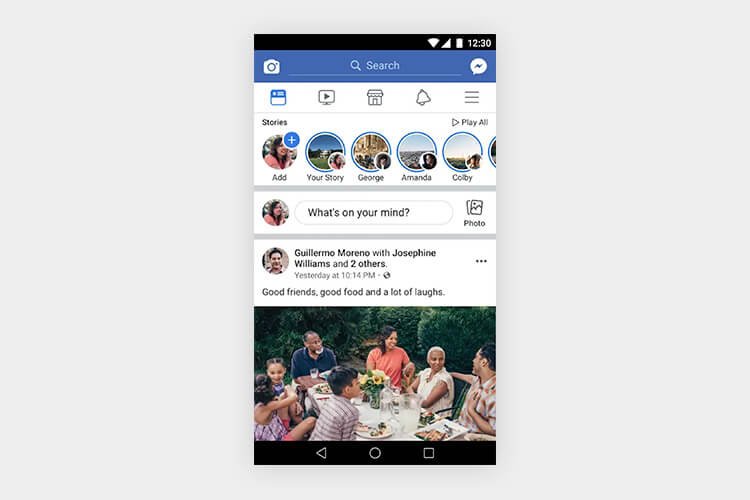
Facebook was undoubtedly the pioneer that started using the hamburger menu. Today it has adapted to new demands and uses Priority+ navigation in its mobile app:
Conclusion
New challenges arise every day as technology grows at an unstoppable, exponential pace. That’s why no solution can ever be declared the ultimate, best and only one; instead, we need user-centered design that adapts to new demands. Soon we may be talking about voice interaction with devices, which would once again lead us to new obstacles and new strategies.

With that said, we hope you enjoyed this post and learned a bit more about how mobile navigation works, its pros and cons and what to consider when choosing one over another.
If you’re interested in web design, here are our previous blog posts: eCommerce design: the online store design process and How to use images correctly in your eCommerce.
If you have any questions and/or want to rethink the mobile version of your eCommerce, don’t hesitate to contact us. We’ll be glad to help. See you soon!