Images on our ecommerce sites, and websites in general, account for a large share of total page weight, so they are largely responsible for load speed
Properly processing and compressing these images is important and necessary.
An overly heavy store will load more slowly, hurting users’ browsing experience.
That’s why we’re seeing growing interest in advice on proper image processing, and part of that interest focuses on these three formats, seemingly new and so little known until now.
Today we’ll focus on them and, specifically, on WebP, which could well become the next standard for images on the internet.
But first, let’s take a quick look at these 3 formats to see what they are and what they can offer.
Next-generation formats
JPEG 2000
Created in 2000 by the Joint Photographic Experts Group, JPEG 2000 was designed to outperform JPEG itself, offering better image compression, with or without quality loss.
This format is supported by much of the image editing software available, and its popularity varies across offline sectors.
Online, however, this format is only supported by Apple’s Safari browsers, on both MacOS and IOS.
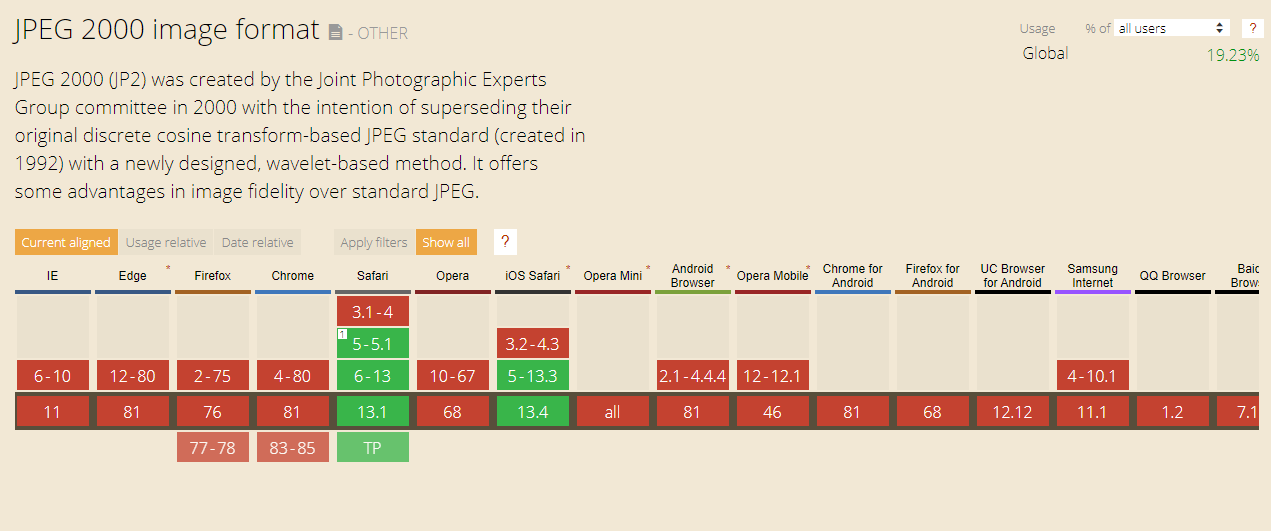 Source: www.caniuse.com
JPEG XR
Created by Microsoft in 2009, with the same aim of delivering higher image quality at a smaller file size than JPEG. Online support is limited to Microsoft browsers: Edge and Explorer.
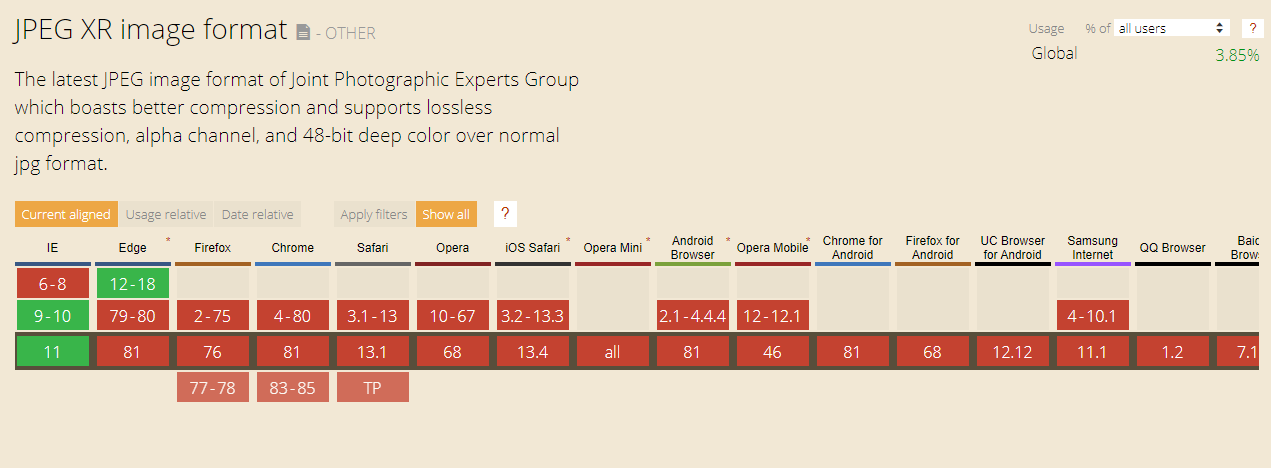 Source: www.caniuse.com
WebP
Finally, there’s WebP, created in 2010 by Google to provide a format specifically for the web.
Like the other two formats, WebP offers better image compression quality than JPEG, and it’s supported by most browsers, reaching 77% of users.
For this reason, WebP is a strong candidate to become the next image compression standard on the internet.
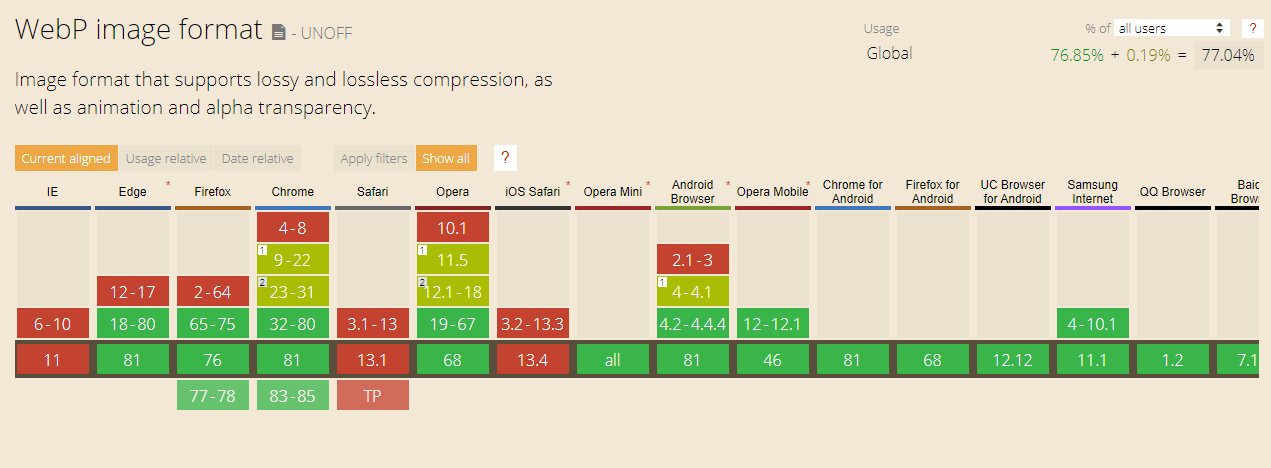 Source: www.caniuse.com
So should we start using WebP now?
This image format has good cross-browser compatibility; however, Apple browsers don’t support it yet, which affects 19% of users.
That’s why, to use this format (or any other), you need to add fallbacks to your HTML / CSS code to make sure no browser is left unable to display the images.
For example, until now, if we wanted to insert an image in our HTML code, we’d do it roughly like this:
<img alt=”This is my face” src=”images/mypicture.jpg”>
Whereas if we use WebP, we need to call the image like this:
<picture>
<source srcset=”images/mypicture.webp” type=”image/webp”><source srcset=”images/mypicture.jpg” type=”image/jpeg”><img alt=”This is my face” src=”images/mypicture.jpg”></picture>
As you can see, we need two copies of the image, one in WebP, and another in JPEG for the fallback, plus several extra lines of code.
For images inserted via CSS, we need to create a specific class for each format and, using javaScript with a plug-in such as Modernizr. apply one class or the other in our HTML depending on whether the client’s browser supports the new format. It would look roughly like this:
.no-webp .container { background-image: url(“mypicture.jpg”); }.webp .container { background-image: url(“mypicture.webp”); }
Using the new format still requires extra work that’s worth weighing up, which is why we don’t fully recommend it yet.
Some websites that need to display huge numbers of images, such as Shutterstock, have already invested in automating the implementation process.
Over time, support for this new format will spread to all browsers, and it’s then —when we can call a WebP file just as we would a JPEG or a PNG— that we’ll recommend using it.
Until then, the classic JPEG and PNG formats are the ones fully supported in all browsers, and by applying good image compression in your favorite image editor or with online tools such as tinypng.com, we can deliver fast browsing that meets users’ expectations.